


Every Tuesday morning, Maria pulls up four different spreadsheets, three Google Docs, and her notebook from last week's session with her executive coaching client. She's got 12 minutes before the call starts. The intake form is buried somewhere in her email from two months ago. Session notes live in a Word document that won't sync properly. The accountability tracker she built in Excel crashes when she tries to update it.
Most coaches spend 15-20 minutes before each session reconstructing their client's journey from scattered pieces. Not because they're disorganized, but because the standard coaching tools weren't built for how sessions actually work.
Stop scrambling through scattered client notes 15 minutes before every session
Every Tuesday morning, Maria pulls up four different spreadsheets, three Google Docs, and her notebook from last week's session with her executive coaching client. She's got 12 minutes before the call starts. The intake form is buried somewhere in her email from two months ago. Session notes live in a Word document that won't sync properly. The accountability tracker she built in Excel crashes when she tries to update it.
Most coaches spend 15-20 minutes before each session reconstructing their client's journey from scattered pieces. Not because they're disorganized, but because the standard coaching tools weren't built for how sessions actually work.
When client data fragments, you miss the patterns that matter
Something worse than wasted time happens when client information spreads across multiple systems. You lose the ability to spot patterns.
Never miss a session or detail again.
Guidyly helps you book, manage, and track every coaching session efficiently.
- Centralized session scheduling
- Automated client reminders
- Progress tracking & notes
No credit card required
A career coach I worked with had been meeting with the same client for four months. During our operational review, we pulled all her session notes into one view. Within minutes, she noticed her client mentioned networking anxiety in seven different sessions—always as a side comment, never as the main topic. She'd missed a core blocker because each mention lived in a different document.
This fragmentation creates three specific problems:
You can't see progress arcs. When homework assignments live separately from session notes, you miss the connection between what clients commit to and what they actually discuss next session. One business coach discovered his clients consistently avoided the exact homework that would move them forward fastest—but only saw this after consolidating six months of scattered notes.
Milestone metrics become meaningless. Tracking "confidence levels" or "implementation scores" means nothing if you can't instantly compare them to the goals discussed three sessions ago. The numbers float without context.
Session prep becomes inefficient. The average coach spends 18 minutes gathering information before each client call. For someone with 20 clients weekly, that's six hours of pure overhead—time that could go toward actual coaching or business development.
What effective coaches actually track
Professional coaches track different metrics than you'd expect. After analyzing session workflows across roughly 40 coaching practices, clear patterns emerged about what data actually drives better outcomes.
The six essential tracking points:
Initial intake context - Not the full questionnaire, but the three core challenges and one primary goal. Everything else is noise during actual sessions.
Session note themes - Not transcripts, but tagged patterns. "Resistance to delegation" or "family boundary issues" become trackable threads across sessions.
Homework completion rate - Binary tracking: did they do it or not? Partial completion counts as "not" because it reveals commitment issues.
Energy levels - How clients show up matters more than what they say. Track whether they seem energized, neutral, or drained at the start of each session.
Breakthrough moments - The specific session where something clicked. One executive coach calls these "penny drop moments"—when clients suddenly see their blind spot.
Next session focus - What you planned to discuss (which often differs from what actually gets discussed).
Notice what's missing? Detailed personality assessments. Long-form journey maps. Complicated scoring rubrics. These might impress clients initially, but they don't improve actual session quality.
Building your single-page session dashboard
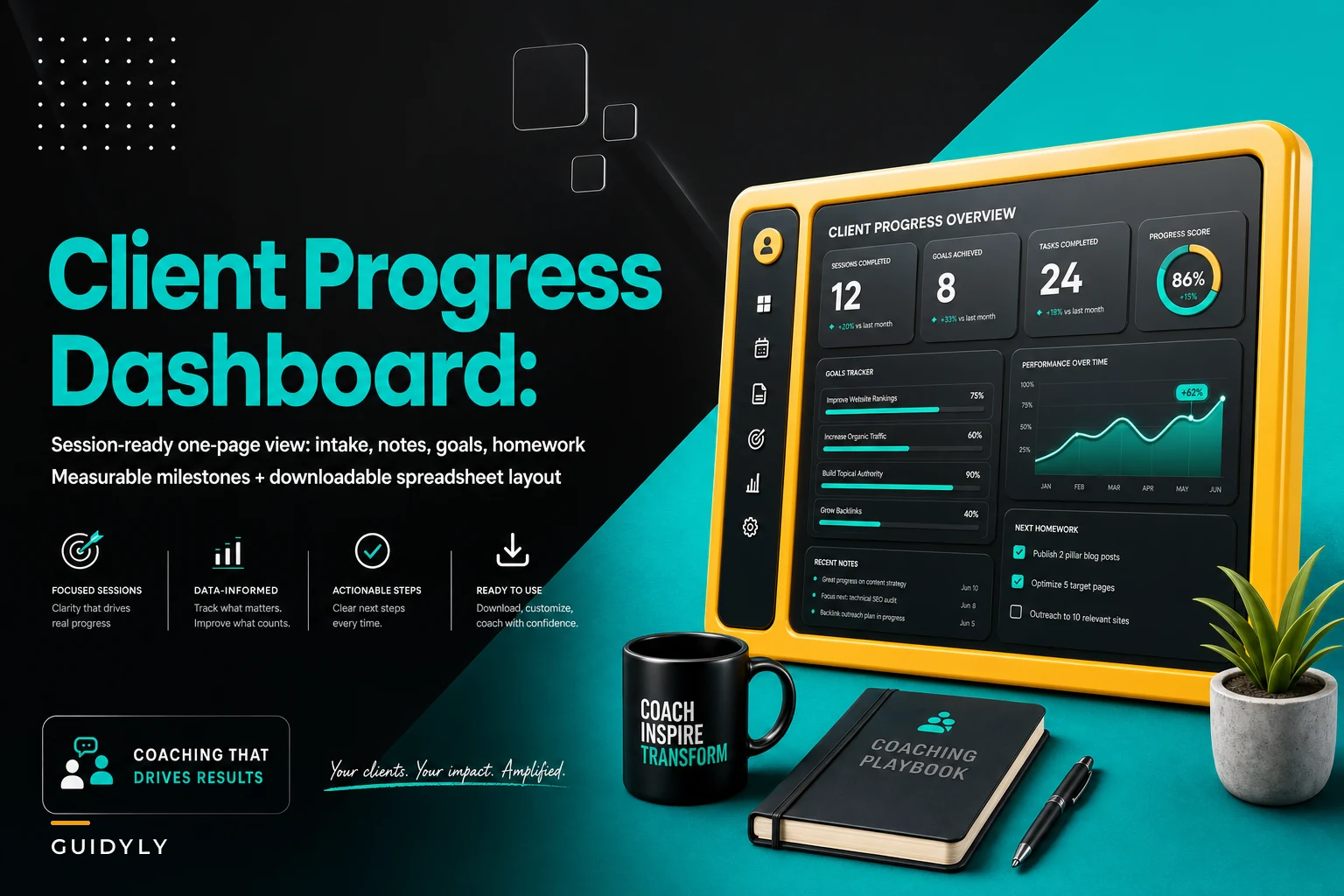
The most effective dashboard fits on one screen without scrolling. Here's the exact layout that works:
Top section: Client snapshot
-
Name and session count
-
Original goal from intake
-
Current challenge focus
-
Next milestone date
Left column: Session history
| Date | Main Topic | Energy Level | Homework Assigned | Status |
|---|---|---|---|---|
| 3/15 | Delegation blocks | Low | Team audit | Complete |
| 3/8 | Staff meeting structure | Medium | Meeting template | Partial |
| 3/1 | Time management | High | Calendar blocking | Complete |
| 2/22 | Leadership presence | Medium | Voice coaching | Not done |
| 2/15 | Team feedback | High | 360 review | Complete |
Right column: Progress indicators
-
Goal progress (simple 1-10 scale)
-
Consistency score (sessions attended vs scheduled)
-
Homework completion rate
-
Breakthrough count
Bottom section: Next session prep
-
Last session's cliffhanger
-
Homework to review
-
Planned discussion topic
-
One powerful question to ask
Keep the dashboard to one screen: if you have to scroll, re-evaluate which metrics truly matter.
This entire dashboard should load instantly when you click a client's name. No searching, no multiple tabs, no reconstruction needed.
The spreadsheet version that actually works
For coaches not ready for specialized software, here's a Google Sheets setup that mimics this dashboard effectively:
-
Dashboard (main view)
-
Session Log
-
Homework Tracker
-
Progress Metrics
-
Intake Archive
Use VLOOKUP formulas to pull data from the detail sheets into your dashboard. This keeps data entry simple while maintaining the one-page view for sessions.
Key formula for pulling latest session notes:
``
=INDEX(SessionLog!B:B,MATCH(MAX(SessionLog!A:A),SessionLog!A:A,0))
``
Color coding makes patterns visible instantly:
-
Green
homework completed
-
Yellow
partial completion
-
Red
not attempted
-
Blue
breakthrough session
One nutrition coach using this system noticed her most successful clients had breakthrough moments every third or fourth session. Clients who went six sessions without breakthroughs had an 80% dropout rate. She now deliberately creates breakthrough opportunities if they haven't happened naturally by session four.
How the dashboard changes everything mid-session
Say you're three minutes into a call with Tom, a VP struggling with team delegation. Your dashboard shows session #8 of 12, original goal of "Build autonomous team by Q3," and—most importantly—the last three sessions all focused on hiring concerns. Homework completion shows 2 out of the last 5 assignments done.
Instead of spending 10 minutes fishing for context, you cut straight to what matters: "Tom, I notice we've shifted from delegation to hiring discussions. What's happening with your existing team that we're not talking about?"
Tom pauses. Admits he doesn't trust his current team to handle what he'd delegate. Something he hadn't stated directly before, but the pattern was right there in the data.
The breakthrough happens in minute 12 instead of session 12.
Client retention through visible progress
Clients quit coaching when they can't see their progress. Simple as that.
A dashboard fixes this. One business coach started screensharing her dashboard during sessions. Clients could see their homework completion rates, energy patterns, breakthrough moments mapped visually.
Retention went up about 35% within three months.
Because clients finally had evidence of their journey. One said, "I didn't realize I'd completed 14 out of 16 homework assignments until you showed me. I kept focusing on the two I missed."
Some coaches worry metrics might make sessions feel corporate. The opposite happens. When clients see you've been carefully tracking their progress, they feel seen. You're not just showing up for calls—you're monitoring their journey.
Dashboard mistakes that kill momentum
Tracking everything. One coach monitored 47 different data points per client. Session prep took 30 minutes. She spent more time updating spreadsheets than coaching. Keep it to 10-12 maximum points you'll actually reference.
Different templates for every client type. Your corporate clients don't need vastly different tracking than your entrepreneurs. Goals, progress, homework, breakthroughs—these stay consistent. One template, minor tweaks only.
Real-time updating. Unsustainable. Update weekly in batches. Friday afternoon works—you're reflecting on the week while it's fresh.
Making clients fill out forms. They won't. They hired you to avoid admin work. Track what you observe during sessions.
When you need more than one page
Some relationships require deeper tracking. Year-long partnerships, complex business consulting, major life transitions.
Don't abandon the dashboard. Layer around it.
One executive coach uses her dashboard as home base with linked detail documents. Dashboard shows current delegation score: 6/10. Click through for the detailed assessment. Return to dashboard for session flow.
For group coaching, create a master view showing all participants. Track participation rates, breakthrough patterns across the cohort, common sticking points. One coach discovered every participant struggled with module 4—restructured it and completion rates jumped from 60% to 85%.
Actually implementing this
Start with one client. Pick your most challenging one—where you constantly feel like you're missing something. Build their dashboard over a weekend. Use it for four sessions. You'll spot patterns immediately.
Week two, add three more. Week three, five more. By week six, your entire practice runs on dashboards.
Time investment:
-
Initial setup
2 hours
-
Per-client setup
15 minutes
-
Weekly maintenance
5 minutes per client
-
Session prep
drops from 15-20 minutes to 2-3 minutes
For 20 clients, that's 5 hours saved weekly. 20 hours monthly. Enough time for four new clients or finally launching that group program.
Automating the tracking workflow
AI-enhanced coaching platforms build these dashboards without manual input. They pull from session recordings, email exchanges, homework submissions.
A simple workflow view:
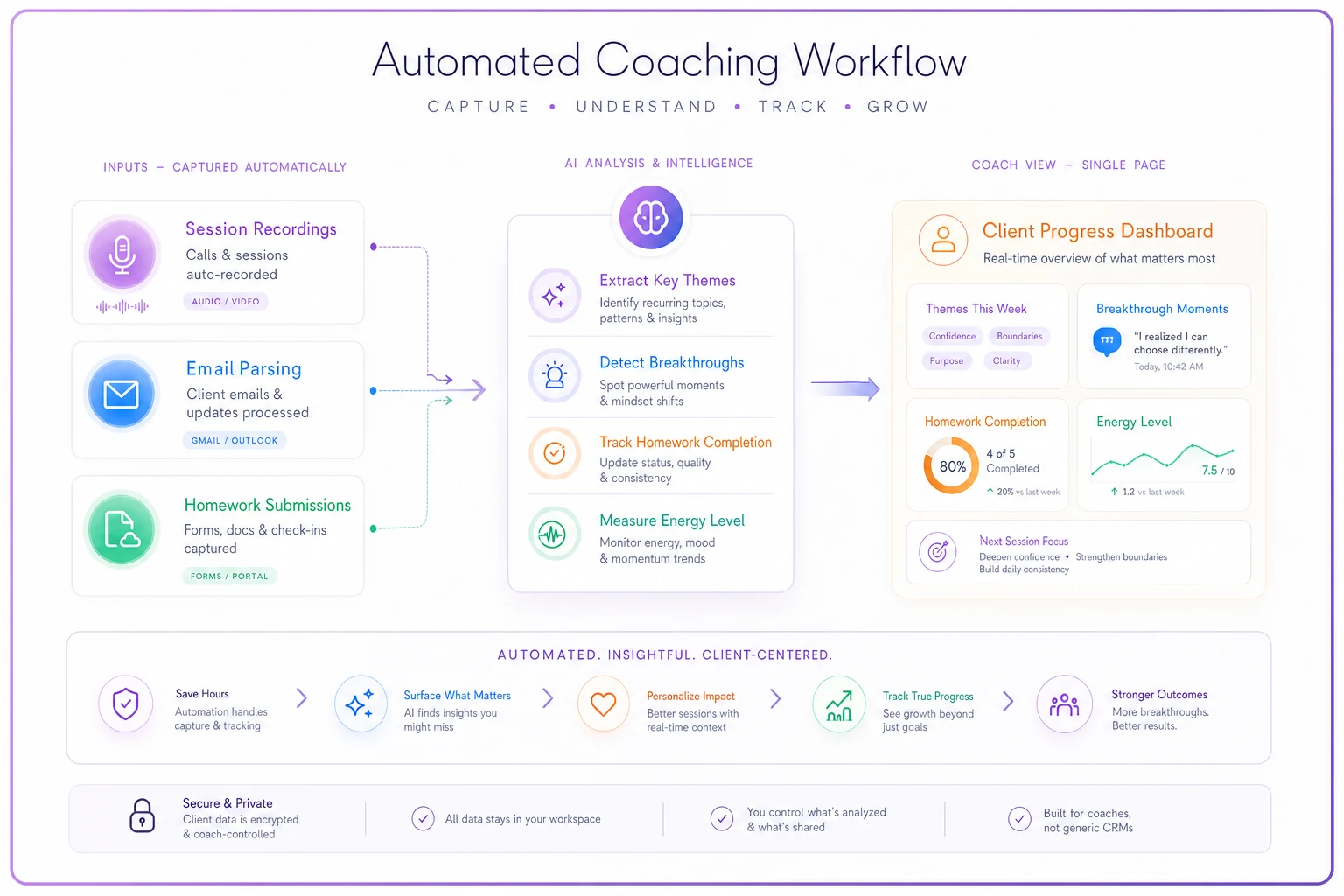
When a client emails completed homework, the dashboard updates automatically. When you finish session notes, the system extracts themes and patterns without manual tagging.
One coach discovered her AI system identified breakthrough moments more accurately than she did. It noticed language pattern changes, email response time shifts, homework quality variations. Patterns invisible to humans but obvious to properly configured automation.
This isn't replacing coaching intuition. It's augmenting it with comprehensive pattern recognition. You guide conversations, make interventions, provide human connection. But with complete operational visibility.
Session prep drops to seconds. Pattern recognition happens automatically. You spend time coaching, not administering.
Making it stick
The perfect dashboard is worthless if you abandon it after three weeks. Integration beats motivation.
Link your calendar to your dashboard system. Click a client meeting, their dashboard opens automatically. No extra steps required.
Set up templates for common scenarios:
-
Career transitions
-
Leadership development
-
Business strategy
-
Life coaching
-
Health and wellness
Each template has different metrics but the same structure. Customize once, use forever.
Friday dashboard reviews work well. Spend 30 minutes looking across your entire practice. Which homework gets completed most? Which session formats generate breakthroughs? Which clients need intervention?
One coach discovered clients who cancelled and rescheduled more than twice usually dropped out within a month. She now addresses commitment after the second cancellation. Retention improved around 20%.
The operational advantage
Coaches with consolidated client data operate differently. They spot problems faster. Make connections others miss. Demonstrate value through visible progress.
When every client's journey is instantly visible, you can handle more clients without quality drops. Associate coaches immediately understand each client's status. Group programs get built on actual patterns, not assumptions.
The dashboard isn't just a tool—it's your coaching operating system. Your frameworks, methodologies, interventions all run on this foundation.
Start with one client. Build one dashboard. Use it one month. The scramble before sessions disappears. Guesswork about client progress ends. The actual coaching finally gets your full attention.
Operations should support expertise, not fragment it. When tools match workflow, technology amplifies coaching instead of complicating it.
The best coaches aren't necessarily the most talented. They're the most operationally efficient. They spend energy on transformation, not administration. A single-page dashboard makes that possible.
Start with one client. Build one dashboard. Use it one month. The scramble before sessions disappears. Guesswork about client progress ends. The actual coaching finally gets your full attention.
Operations should support expertise, not fragment it. When tools match workflow, technology amplifies coaching instead of complicating it.
The best coaches aren't necessarily the most talented. They're the most operationally efficient. They spend energy on transformation, not administration. A single-page dashboard makes that possible.
Ready to elevate your coaching business?
Join hundreds of coaches using Guidyly to save time, enhance client engagement, and grow their practice.