

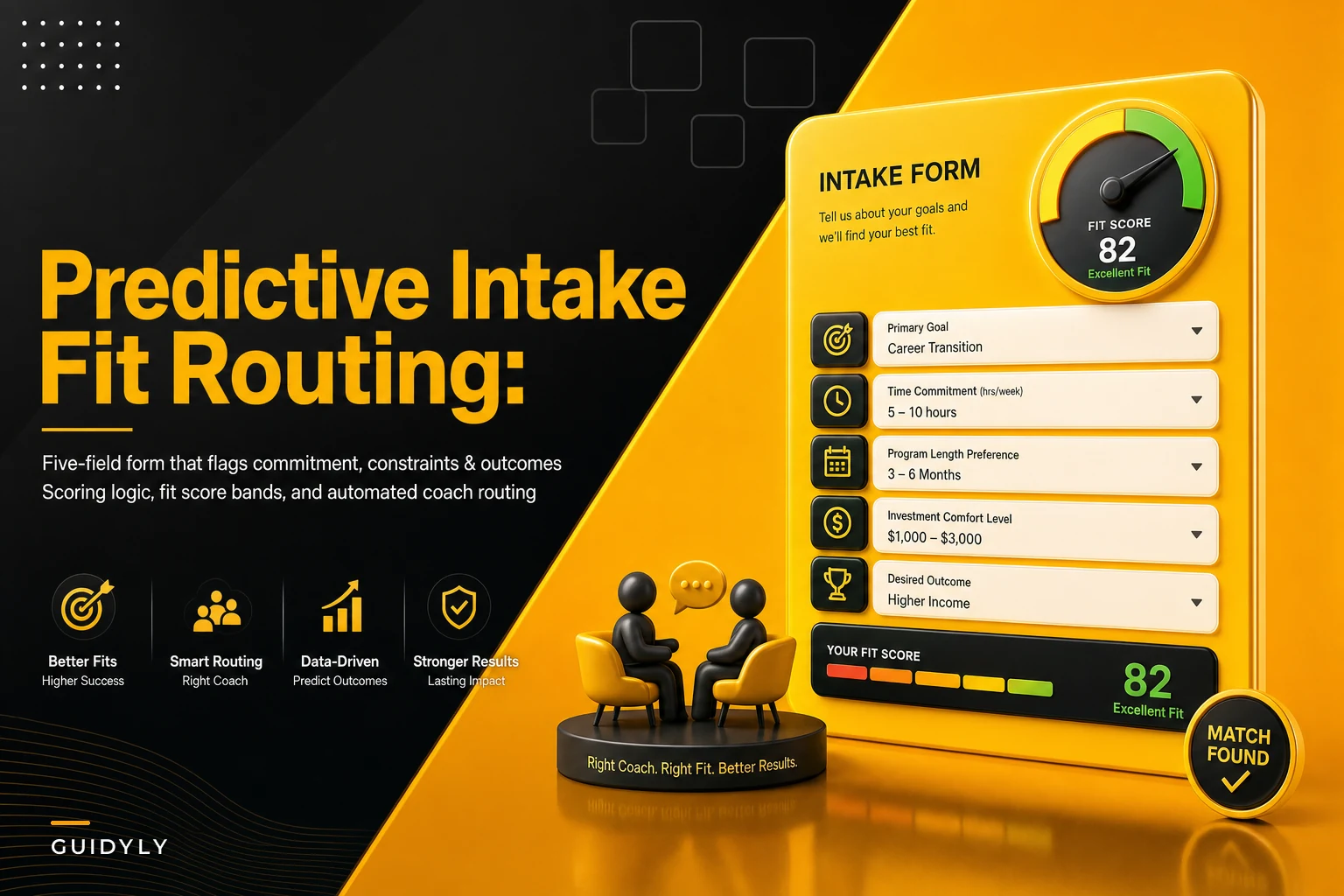

Most coaching intake forms collect information that feels useful but predicts almost nothing. Name, email, "what are you struggling with," maybe a dropdown for how they found you. Then you get on a discovery call, spend 45 minutes figuring out whether the person is even a fit, and half the time you already knew after the first ten minutes.
The problem isn't that you need more questions. It's that the questions you're asking don't correlate with anything that actually determines whether someone succeeds in your program, pays on time, or refers others. A tighter, predictive intake form fixes this — not by being longer, but by asking the three or four things that genuinely separate a good-fit client from a time sink.
This post walks through how to build a coaching intake form template around predictive fields, then how to score and route the responses so the form does the sorting for you before you ever hop on a call.
What "predictive" actually means here
A field is predictive when the answer meaningfully changes the odds of a good outcome. That's a higher bar than "interesting to know."
Take a common intake question: "What's your biggest challenge right now?" People write a paragraph, it feels rich, and it tells you almost nothing about whether they'll show up, do the work, or churn in month two. Compare that to: "In the next 90 days, how many hours per week can you realistically protect for this work?" The second question predicts completion. The first predicts nothing except how good someone is at describing pain.
The fields that consistently predict fit fall into three buckets:
-
Commitment indicators — signals that the person will actually do the work and stay
-
Constraints — money, time, decision authority, timeline realities that determine whether your program is even feasible for them
-
Outcome expectations — what they think success looks like, and whether that matches what you can actually deliver
Everything else on your form is administrative. Useful for onboarding, useless for prediction. Keep the predictive fields sharp, and don't drown them in demographic filler.
The three field categories, with the questions that actually work
Commitment indicators
Never miss a session or detail again.
Guidyly helps you book, manage, and track every coaching session efficiently.
- Centralized session scheduling
- Automated client reminders
- Progress tracking & notes
No credit card required
You're trying to measure follow-through before it costs you a slot. The trick is asking questions where a low-commitment person self-identifies without realizing it.
-
"Have you worked with a coach or done a structured program like this before? What happened?" — Past behavior is the single best predictor of future behavior. Someone who quit two programs will probably quit yours.
-
"On a scale of 1–5, how ready are you to make changes even when they're uncomfortable?" — Anyone who picks a 3 is telling you they're browsing.
-
"What have you already tried to solve this on your own?" — People who've tried nothing usually aren't in enough pain yet.
The pattern worth noticing: vague, aspirational answers ("I just really want to grow") score low, while specific, slightly frustrated answers ("I tried building an SOP library last year and abandoned it after two weeks") score high. Specificity is a commitment signal.
Constraints
This is where you catch the mismatches that waste calls. Constraints aren't disqualifiers by default — they're routing information.
-
Budget range as a band, not an exact number. "Under $500 / $500–1,500 / $1,500–4,000 / $4,000+ per month." People answer bands honestly far more often than they'll type a real number.
-
Decision authority — "Are you the person who signs off on this, or is someone else involved?" Critical if you sell to teams or households where a spouse or manager holds veto power.
-
Timeline — "When do you want to start?" Someone who says "in the next 6 months" is not the same lead as "this week," and shouldn't get the same routing.
One mistake coaches make: treating a low budget as a hard no. It's not. It's a signal to route toward a lower-tier product, a group program, or a nurture sequence — not to burn a discovery call on someone who was never going to convert at your core price point anyway.
Outcome expectations
The most under-used category, and the one that prevents the ugliest client relationships. Mismatched expectations are behind most refund requests and one-star reviews.
-
"What would make this a clear success for you six months from now?"
-
"What result are you hoping for, and by when?"
What you're really looking for is unrealistic expectations. If someone writes "I want to 10x my revenue in 60 days" and you run a slow-and-steady operations program, that's a mismatch you want to see on the form — not discover in month three. You can either route them out or flag the call to reset expectations early.
Sample scoring logic
Here's a scoring model you can actually implement. Assign points per field, sum them, and let the total drive routing. The exact weights matter less than being consistent — but these reflect how the categories tend to predict in practice.
| Field | Answer | Points |
|---|---|---|
| Prior program experience | Completed one and got results | +3 |
| Never tried anything structured | +1 | |
| Quit one or more programs | 0 | |
| Readiness (1–5) | 5 | +3 |
| 4 | +2 | |
| 3 or below | 0 | |
| Time available/week | 3+ hours | +3 |
| 1–2 hours | +1 | |
| Under 1 hour | 0 | |
| Budget band | Matches your core offer | +3 |
| One tier below | +1 | |
| Two+ tiers below | 0 | |
| Decision authority | Sole decision-maker | +2 |
| Needs one other person | +1 | |
| Committee / unclear | 0 | |
| Timeline | This week / this month | +2 |
| 1–3 months | +1 | |
| 3+ months | 0 | |
| Outcome realism (your judgment) | Realistic + specific | +3 |
| Vague | +1 | |
| Unrealistic | -2 |
Max score lands around 19. The negative on unrealistic expectations is intentional — it can drag an otherwise-strong lead down, which is exactly what you want, because expectation mismatch causes more damage than a soft budget.
Routing rules based on the score
Once you have a number, the routing writes itself. A rough banding that works for most solo and small-team practices:
-
15–19 — Fast-track. Send straight to your calendar for a discovery/closing call. These people are ready, funded, and realistic. Don't make them jump through hoops.
-
10–14 — Qualify first. Route to a short pre-call questionnaire or a lower-friction offer (paid intensive, small group). They're promising but something needs clarifying — usually budget or timeline.
-
6–9 — Nurture. Not now, but not never. Route to your email sequence, a self-serve resource, or a group cohort. Following up in 60–90 days often converts these.
-
Below 6, or the unrealistic-expectations flag fired — Redirect or decline politely. Send a resource, a referral, or a lower-tier product. A gracious "here's what might actually help you right now" protects your reputation and your calendar.
The routing logic also lets you match people to the right product, not just yes/no. A high-readiness lead with a two-tiers-below budget isn't a reject — they're a fit for your group program. A high-budget lead with low time availability might belong in a done-for-you or advisory tier rather than a homework-heavy coaching track.
When this makes sense — and when it doesn't
This makes sense when you're getting enough inbound that discovery calls have become a bottleneck, or when your no-show and no-fit rate on calls is climbing. If you're spending three calls to close one client, scoring pays for itself fast.
This is a bad idea when your volume is tiny. If you get four inquiries a month, just talk to all four. Building scoring logic for a handful of leads is over-engineering, and you'll learn more from the conversations anyway.
Who should not do this: coaches whose entire value is high-touch, relationship-first sales, where a form feels cold and the personal call is the differentiator. Even then, a two-question version — budget band plus timeline — can quietly pre-sort without hurting the warmth.
A real scenario
A leadership coach running a solo practice was pulling in somewhere around 30–40 inquiries a month through referrals and a modest content presence. She took nearly every call. Roughly half went nowhere — wrong budget, not ready, or expecting a quick fix she didn't offer. She was burning 15 to 20 hours a month on calls that never converted.
She rebuilt her intake around eight fields, scored them, and set three routing bands. Fast-track leads booked directly. Mid-tier leads got a short paid strategy session as a stepping stone. Clearly-mismatched prospects got a warm email with a referral or a free resource.
Over the following quarter, her discovery-call volume dropped by roughly a third, but her close rate on the calls she did take climbed noticeably — from something like one in four to closer to one in two. She wasn't working more. She was talking to fewer, better-matched people. The paid strategy session also pulled in a chunk of the "not quite ready" leads she'd previously written off entirely.
Nothing about this required more marketing. It was purely a sorting improvement.
Building the workflow so it runs without you
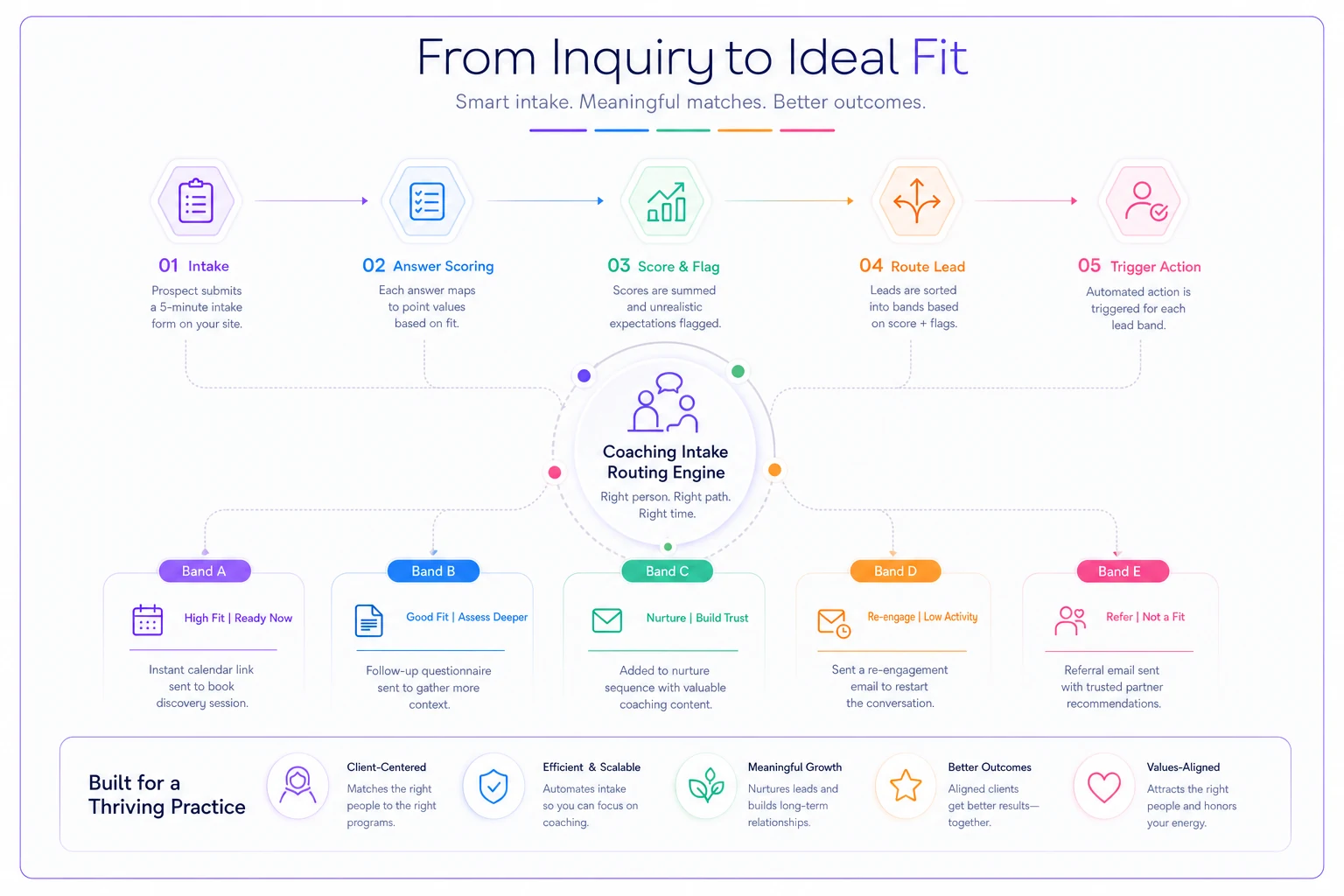
A predictive form only helps if the routing actually happens. The basic flow looks like this:
-
Prospect submits the form
-
Each answer maps to a point value
-
Points sum into a total; the unrealistic-expectations flag is checked separately
-
The total drops the lead into one of your routing bands
-
The band triggers the next action — calendar link, questionnaire, nurture sequence, or referral email
You can run a bare-bones version of this manually. A spreadsheet with a scoring column and a filter is genuinely enough to start. Score ten leads by hand and you'll immediately see whether your weights match reality. If the fast-track people keep flaking, the commitment weights probably need adjusting. Treat the model as a living thing for the first month or two.
Score your first 10–20 real leads manually in a spreadsheet to validate weights before automating the workflow.
As volume grows, the manual version breaks down. That's where an operational platform that scores and routes intake automatically starts earning its keep — tagging leads, triggering the right sequence, keeping the sorting consistent so a good lead doesn't sit in your inbox for two days losing interest. But the point isn't the software. The logic is doing the qualifying, whether a spreadsheet or a platform is executing it.
A quick build checklist
[ ] Cut your form to 6–9 fields; kill anything that doesn't predict outcome, commitment, or feasibility
[ ] Include at least one commitment indicator, one constraint, and one outcome-expectation field
-
[ ] Cut your form to 6–9 fields; kill anything that doesn't predict outcome, commitment, or feasibility
-
[ ] Include at least one commitment indicator, one constraint, and one outcome-expectation field
-
[ ] Use budget bands, not open-ended amounts
-
[ ] Assign point values to each answer, including a penalty for unrealistic expectations
-
[ ] Define 3–4 routing bands with a specific next action for each
-
[ ] Score your last 20 real leads by hand to sanity-check the weights
-
[ ] Adjust weights after the first month based on who actually converted and stuck
Adjust weights after the first month based on who actually converted and stuck
The part most coaches miss
The mistake isn't building a bad form — it's treating the form as a data-collection step instead of a decision. If your intake doesn't change what happens next depending on the answers, it's just a fancy contact box.
The whole value of predictive fields plus scoring is that the low-fit conversation never happens, the right-fit person skips the friction, and the maybe gets a path that actually fits their situation. You stop trading calendar time for information you could have surfaced in five minutes of well-designed questions.
Get the three categories right — commitment, constraints, expectations — weight them honestly, and let the score decide who you talk to next.
Get the three categories right — commitment, constraints, expectations — weight them honestly, and let the score decide who you talk to next.
Ready to elevate your coaching business?
Join hundreds of coaches using Guidyly to save time, enhance client engagement, and grow their practice.