

Most coaches don't really prep sessions. They skim. Two minutes before the call, you're scrolling your notes app trying to remember what the client committed to last time, whether they followed through, and where you left off on the bigger arc. Then the call starts, you improvise the first five minutes, and the "structure" you promised in your sales page quietly disappears.
The problem isn't disorganization. Agenda-building is a decision task disguised as an admin task. Every session, you're answering the same handful of questions: What's the priority today? Did they do the homework? Are we still on track? Those answers already live in your intake form and your notes — they're just scattered, so your brain re-fetches and re-sorts them every single time.
This piece walks through a practical if/then ruleset you can drop into a spreadsheet (or a lightweight automation) that assembles a 10‑minute session agenda from three inputs: intake priorities, your most recent session notes, and homework completion status. No AI magic required to start — just clean logic. The goal is to make the agenda fall out of data you already collect.
Why prep collapses (and why it's predictable)
Session prep fails because the information you need is spread across at least three systems that don't talk to each other: the intake form (usually a Google Form or Typeform export), your notes (a doc, Notion page, or whatever you're using), and whatever mental record you keep of homework.
This usually becomes a real problem somewhere between 15 and 30 active clients. Below that threshold, you can hold the context in your head. Above it, the switching cost explodes. You open the call cold, spend the first few minutes reconstructing context, and the client feels it — even if they can't name it.
There's also a quieter failure mode. When you improvise the opening, you default to "So, how's it going?" It's a comfortable question and a terrible one. It hands the agenda to the client, who tends to talk about whatever's loudest that day rather than what actually moves their goal forward. A predefined agenda protects the arc of the engagement from the noise of any given week.
If your notes are the bottleneck — and for most coaches they are — it's worth fixing that layer first. We've written separately about why session notes fail coaches and a lightweight KM system that turns notes into curriculum improvements, because an agenda generator is only as good as the notes feeding it.
The three inputs, and what each one decides
An agenda generator needs to answer three things. Each input maps cleanly to one decision.
Never miss a session or detail again.
Guidyly helps you book, manage, and track every coaching session efficiently.
- Centralized session scheduling
- Automated client reminders
- Progress tracking & notes
No credit card required
| Input | What it decides | Where it lives |
|---|---|---|
| Intake priorities | The client's top goal + any hard constraints (time, sensitivities, non-negotiables) | Intake form, captured once at onboarding |
| Recent session notes | The open thread from last time + any commitments made | Notes doc, updated each session |
| Homework completion | Whether to reinforce, troubleshoot, or escalate accountability | A single status field you update post-session |
None of these need to be sophisticated. Homework completion can be a one-word status. Intake priority can be a single sentence. The power comes from combining them with rules, not from any one field being detailed.
A typical example: intake says the client's top goal is "get to 3 sales calls a week." Last session's note says "committed to drafting outreach script by Friday." Homework status says "Not done." That combination should produce a very specific agenda — one that opens with a troubleshoot, not a celebration, and definitely not a fresh topic.
The core if/then ruleset
Rule 1 — Homework not done, second time in a row → Accountability block first.
If homework status is "Not done" and the prior session was also "Not done," the agenda opens with a short accountability conversation, not more content. Two misses in a row is a signal, not a coincidence.
Rule 2 — Homework not done, first time → Troubleshoot block first.
Single miss. Open by unpacking why — was it unclear, too big, or deprioritized? Diagnostic, not punitive.
Rule 3 — Homework done → Debrief + advance.
Open with a 2‑minute debrief of what they learned, then move straight to the next step in the arc. Don't linger on success; use it as fuel.
Rule 4 — Open thread flagged in notes → Reserve a mid-session block.
If last session's note contains an unresolved item (tagged something like #open), the generator inserts a block to close it before introducing anything new.
Rule 5 — Intake constraint triggered → Insert a guardrail note.
If intake flagged a sensitivity (say, "avoid pushing on finances until trust is built"), the agenda carries a one-line reminder at the top so you don't blunder into it.
Rule 6 — No open threads, homework done, mid-engagement → Progress checkpoint.
Every 4th session or so, replace the standard debrief with a wider "are we still aimed at the right goal?" review, pulled from the intake goal.
You can extend this, but six rules cover the overwhelming majority of real sessions. Resist the urge to build 40 rules for edge cases you'll hit twice a year.
The 10‑minute agenda template it produces
Every agenda the system outputs fits the same skeleton, which is why it can be assembled mechanically. A coaching call agenda that reads in under 10 seconds and preps you in under 10 minutes:
-
Guardrails (if any) one line from intake, e.g. "Don't push on the co-founder conflict yet."
-
Opening block (rule-driven) debrief / troubleshoot / accountability — pulled from the homework logic above.
-
Open thread (if flagged) the specific unresolved item from last session, quoted verbatim from notes.
-
Core focus the next step toward the intake goal.
-
Commitment the homework to assign, phrased as a specific action with a deadline.
-
Note-to-self anything to capture during the call so next week's generator has clean input.
That last line matters more than it looks. The agenda's job isn't only to prep this session — it's to make sure next session's inputs get captured. That closed loop is what keeps the whole thing running without decaying after three weeks.
Building it in a spreadsheet: the actual process
You don't need automation software to start. A spreadsheet with a few columns and formulas does the job. Here's the build order:
-
Create a client row per active client with columns
Intake Goal,Intake Constraint,Last Homework Status,Prior Homework Status,Open Thread,Session Count. -
Add a "Homework Streak" helper column using a formula that checks whether both the last and prior status equal "Not done." This drives Rule 1 vs Rule 2.
-
Write the opening-block formula. A nested IF that reads
if streak = 2 misses → "Accountability"; else if last = "Not done" → "Troubleshoot"; else → "Debrief + advance."
-
Add a checkpoint flag that returns "Progress checkpoint" when
Session Countis divisible by 4. -
Assemble the agenda text in one final column by concatenating the guardrail, the opening block, the open thread, and the core focus into a single readable block.
-
Update three fields after each session homework status, open thread, and increment the session count. That's your entire ongoing workload — maybe 60 seconds per client.
The whole thing is one tab. When you sit down to prep, you read the assembled column. The spreadsheet did the sorting your brain was doing manually.
Use a dropdown for homework status to standardize values and make formulas reliable.
Quick visual of the spreadsheet workflow.
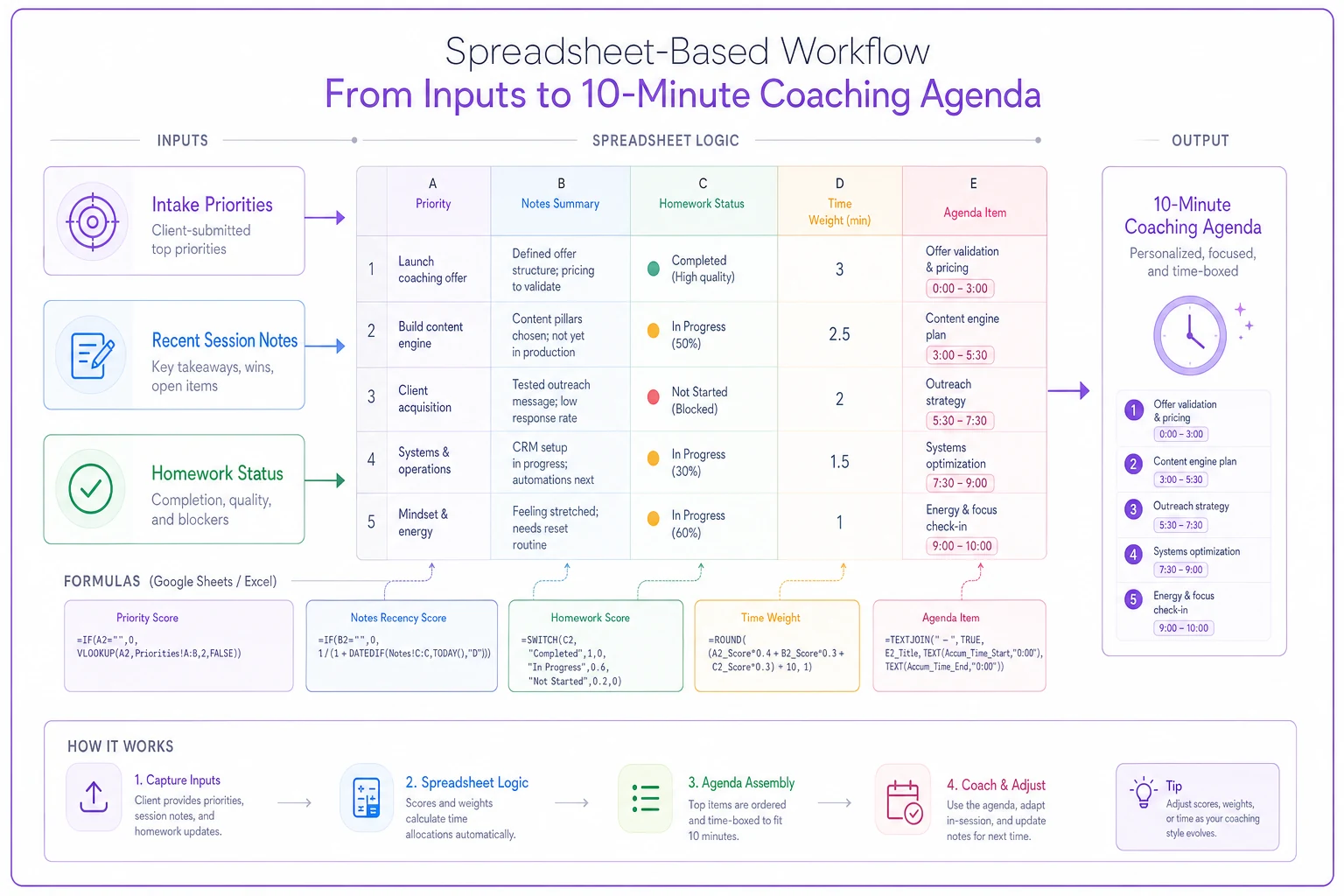
The whole thing is one tab. When you sit down to prep, you read the assembled column. The spreadsheet did the sorting your brain was doing manually.
A real scenario
A solo leadership coach running around 22 active clients was spending roughly 12–15 minutes per session on prep — reconstructing context, hunting for last week's commitment, figuring out where to start. Across a week of maybe 18 sessions, that's close to four hours just on ramp-up, and the sessions still opened unevenly.
She moved to a spreadsheet version of this ruleset. Intake goals and constraints were entered once. Homework status became a dropdown updated right after each call. Prep dropped to around 3–4 minutes per session — mostly just reading the assembled agenda and adding one personal touch.
The bigger change wasn't the time saved. Homework misses stopped slipping through. Under the old system, a "not done" week often got glossed over with a polite "no worries, let's move on." The accountability rule forced the conversation the second time it happened. Over a couple of months, homework completion across her book climbed noticeably, because clients understood that a miss would be addressed, not absorbed. That's a retention lever hiding inside a prep tool.
When this makes sense — and when it doesn't
When it's worth building: You're past roughly 15 active clients, you run a repeatable methodology with some arc from onboarding to outcome, and you already capture homework in some form. The ruleset assumes there's structure to protect.
When it's a bad idea: If your work is genuinely emergent — deep therapeutic or crisis-adjacent coaching where the agenda should be whatever the client walks in with — a rules-driven opener can feel mechanical and wrong. Some coaches use a stripped-down version: guardrails and open threads only, no homework logic.
Who should skip it for now: Coaches with fewer than 10 clients who can still hold context comfortably. You'll spend more time maintaining the sheet than you save. Build the habit of capturing homework status and open threads now, and add the ruleset later when volume justifies it.
Where automation genuinely helps
The spreadsheet works. But there's a ceiling. Two things break as you grow: someone has to manually update three fields per client after every session, and pulling last session's notes into the sheet is copy-paste labor that people skip when they're tired.
This is where AI-assisted operational software earns its place — not as a gimmick, but by handling the boring plumbing. If your notes are already being captured (transcripts, structured summaries), an automation layer can extract the open-thread flag and the homework commitment automatically, then feed the ruleset without you retyping anything. The logic stays exactly the same; the data entry disappears. The best setups keep the coach fully in control of the rules while letting the system assemble and pre-fill the agenda from whatever notes and intake data already exist.
The same data that powers this agenda also feeds a client-facing view worth maintaining — pairing the internal agenda with a one-page client progress dashboard you can use every session means the client sees their arc while you run the structure behind it.
Start small, and protect the arc
Don't build the full automated version first. Start with the spreadsheet, six rules, and the discipline of updating three fields after each call. Run it for a month. You'll find the two or three rules that actually fire for your practice, and you can trim the rest.
The real win here isn't saving ten minutes of prep, though you'll get that. It's that every session opens on purpose instead of by default — homework gets addressed, open threads get closed, and the client's original goal stays in the room even during weeks when they'd rather talk about something else entirely. That consistency is what people are actually paying for when they hire a coach with a "system." The agenda generator just makes that system show up reliably, session after session, without depending on you remembering everything at 8:59am.
Ready to elevate your coaching business?
Join hundreds of coaches using Guidyly to save time, enhance client engagement, and grow their practice.