


There's a specific moment that trips up more coaches than almost anything else in their operations: a client asks, six months after a session, "Can you delete that recording of me crying about my boss?" And the coach realizes they have no idea where that file actually lives. Is it in Zoom's cloud? Did it auto-sync to a shared Google Drive folder the VA can see? Is it sitting in a transcription tool that trained on the audio?
That fumbling, panicky search is the real cost of not having a recording policy. Not a lawsuit — most coaches never get sued. The cost is the erosion of trust in the exact moment a client is testing whether you're someone who handles their private material carefully.
This isn't legal advice, and it's not a compliance lecture. It's an operational checklist built around the actual failure points coaches hit when they record sessions. If you record calls — for notes, for client review, for your own supervision — this is the stuff that quietly goes wrong.
The consent problem isn't the yes — it's the vagueness
Most coaches think they have consent handled because the client clicked "OK" when Zoom popped up the recording notice, or because a line in the intake agreement mentions recordings. That's technically a yes. It's also nearly useless the moment a client changes their mind or a situation gets awkward.
The gap shows up in specifics. A client agrees to be "recorded for note-taking purposes." Eight months later you want to use a 40-second clip in a course module or a supervision group. Did they consent to that? Not really. The original yes covered one purpose, and now you're stretching it to cover three.
Vagueness usually happens because consent gets treated as a one-time gate instead of something scoped to a purpose. The fix is writing consent in short, purpose-specific snippets that a client can actually understand and that you can reference later when things get complicated.
-
Session recording (internal) "This session may be recorded so your coach can review notes and prepare for future sessions. Recordings are stored securely and are not shared outside your coaching relationship."
-
Client access "You can request a copy of your session recording at any time. Just email us and we'll send a secure link."
-
Transcription/tools "We use a transcription tool to turn recordings into written notes. Audio is processed by [tool] and deleted from that tool within [X] days."
-
Teaching/supervision (separate opt-in) "Occasionally we'd like to use short, anonymized clips for coach training or supervision. This is optional and requires a separate yes — declining changes nothing about your coaching."
-
Withdrawal "You can withdraw consent and request deletion at any time. We'll confirm deletion within [X] business days."
The teaching/supervision snippet is broken out on purpose. Bundling "we might use your voice in a class someday" into the same checkbox as "we're taking notes" is the single most common way coaches accidentally overstep. Separate the sensitive uses.
Why "keep everything forever" is the default — and why it's a liability
Almost nobody chooses to hoard recordings. It just happens. Zoom saves to the cloud automatically, the files accumulate, and deleting them feels like a chore nobody scheduled. So a coach three years in has 600 recordings sitting in cloud storage, most of which they'll never open again.
Never miss a session or detail again.
Guidyly helps you book, manage, and track every coaching session efficiently.
- Centralized session scheduling
- Automated client reminders
- Progress tracking & notes
No credit card required
Every recording you keep is a recording you're responsible for. If a storage account gets breached, or a VA relationship ends badly, or a client asks what you still have on file, that backlog becomes exposure. Data you deleted can't leak.
A retention schedule solves this by making deletion a default instead of a decision. You decide once, and the system runs. Here's a starting framework — adjust the windows to how you actually work:
| Recording type | Keep for | Then | Notes |
|---|---|---|---|
| Standard session recording | 30–90 days | Delete after notes are written | Most coaches only need it long enough to write notes |
| Notes/transcript (text) | Duration of engagement + 1–2 yrs | Archive or delete | Text is lower-risk and more useful than raw audio |
| Intake/assessment recordings | Duration of engagement | Delete at offboarding | Sensitive; short leash |
| Teaching/supervision clips | Per separate consent | Delete when consent expires | Tie deletion to the opt-in, not the engagement |
| Client-requested copies | N/A (client holds it) | Confirm your copy deleted if requested | Don't keep a shadow copy |
The thing most coaches miss: the recording and the notes have completely different value profiles. Raw audio is high-risk and low-reuse. Written notes are low-risk and high-reuse. Once your notes are done, the recording is mostly a liability sitting on a server. If you want your notes to actually earn their keep, how you structure and reuse them matters more than the audio — something we get into in why session notes fail coaches and how to turn them into curriculum improvements.
Secure storage: where files actually live vs. where you think they live
A pattern that comes up constantly. A coach believes their recordings are "in Zoom." In reality, the files are:
-
In Zoom cloud (with a share link that may not expire)
-
Auto-downloaded to a laptop's Downloads folder
-
Synced to a personal Google Drive that's logged in on three devices
-
Emailed to a client as an attachment, now sitting in two inboxes forever
-
Fed to a transcription tool that keeps a copy
A workable storage approach:
-
Pick one primary store. Decide where recordings live — a single access-controlled cloud folder — and make everything else temporary. No "I'll just keep a copy on my desktop."
-
Turn off auto-download. The convenience of files landing in Downloads is exactly what creates the scatter. Let them stay in the controlled store.
-
Use expiring links, never attachments. When a client wants a copy, send a link that expires in a few days. Attachments live forever in inboxes you don't control.
-
Audit your tools quarterly. Open each app touching your recordings and check its retention setting. Transcription tools especially — many keep audio unless you tell them not to.
-
Encrypt at rest where you can. Most reputable cloud storage does this by default, but confirm it rather than assuming.
Here's a quick sketch of the workflow.
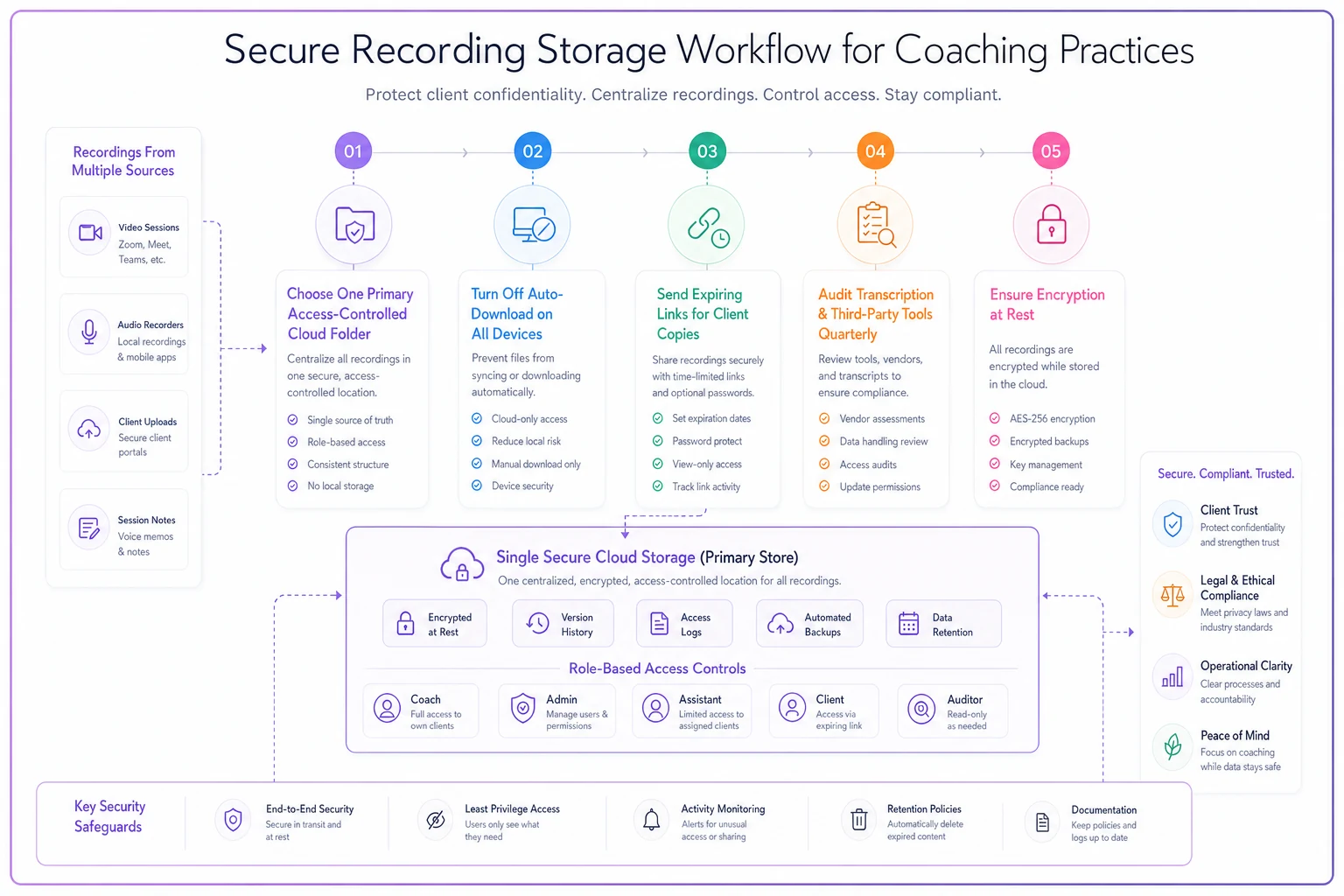
Turn off auto-download on every device to prevent accidental local copies that proliferate without you noticing.
Scatter happens through convenience defaults, not decisions. If you never chose to have a copy on your laptop but there's one there anyway, that's a default working against you.
Role-based access: the VA problem
Small practices grow into an access mess almost by accident. You hire a VA to handle scheduling. To do that, you share the Google Drive. The Drive happens to contain the folder with session recordings. Now your VA — hired for calendars — can watch a client's most vulnerable session.
-
You (coach) Full access to recordings, notes, client files.
-
Associate/second coach Access only to their own clients' recordings and notes.
-
VA / admin Scheduling, billing, and non-sensitive documents. No default access to session recordings.
-
Transcription tool Access to audio only for the processing window, then revoked.
-
Bookkeeper Billing data only — and billing shouldn't live in the same place as recordings anyway. Keeping financial and session data separated also makes your payment recovery and dunning workflows cleaner, since the person chasing a failed payment never needs to be near a session file.
The mistake to avoid: granting access by person ("I trust Sarah") instead of by role ("scheduling role needs the calendar, not the recordings"). Trust is real, but access should map to job function, because roles outlast individuals. When Sarah leaves and a new VA starts, you want to hand over a role, not untangle six years of ad-hoc permissions.
A real scenario
A solo leadership coach — running around 60–70 recorded sessions a month across a dozen clients — had built up close to 400 recordings over two years in a personal cloud drive that was also shared with a part-time assistant for scheduling.
Two things forced a cleanup. A client asked for deletion of a specific emotional session, and it took the coach nearly an hour to find and confirm it was actually gone from every location. It wasn't — a copy had synced to a laptop. Around the same time, the coach realized the assistant technically had access to every recording, which was never the intent.
The fix wasn't complicated. Recordings moved to a single access-controlled folder the assistant couldn't see. Auto-download got turned off. A 60-day deletion rule went on standard session recordings, with notes kept as text instead. Client copies switched from email attachments to expiring links.
The backlog dropped from roughly 400 files to under 80 within a couple of months. Deletion requests went from an hour of anxious searching to a few minutes. No dramatic revenue number — this is trust and risk, not sales. But when the next client asked the "can you delete it" question, the answer was fast and confident, and that confidence is the whole point.
Your incident-response outline
Most coaches have zero plan for the day something goes wrong — a laptop stolen, a share link leaked, a tool breach reported in the news. You don't need a corporate playbook. You need a one-page outline you could actually follow while stressed.
-
Contain. Immediately revoke the exposed access — kill the share link, change the password, remove the tool's access. Stop the bleeding first.
-
Assess scope. Which recordings? Which clients? What was actually exposed vs. potentially exposed? Write it down; don't guess from memory.
-
Notify affected clients directly. Plainly, quickly, personally. "Here's what happened, here's what was affected, here's what we've done." Coaches who go quiet lose more trust than the incident itself caused.
-
Fix the root cause. If a link didn't expire, set links to expire. If a laptop had local copies, turn off auto-download. Close the specific door that opened.
-
Document what happened and what changed. A few sentences in a running log — both for your own memory and as evidence that you take this seriously.
The damage from an incident is rarely the exposure itself. It's the client discovering you handled it clumsily or hid it. A fast, honest response often preserves the relationship even after a genuine screw-up.
Your working checklist
Run through this once, set it up, and it mostly runs itself:
-
- [ ] Consent snippets rewritten in plain language, scoped by purpose
-
- [ ] Teaching/supervision use split into a separate, optional opt-in
-
- [ ] Retention windows chosen for recordings vs. notes (they should differ)
-
- [ ] Deletion set to happen by default, not by manual decision
-
- [ ] One primary storage location chosen; auto-download turned off
-
- [ ] Client copies sent via expiring links, never attachments
-
- [ ] Access mapped to roles, not individuals
-
- [ ] VA/admin access to session recordings removed unless genuinely needed
-
- [ ] Transcription and third-party tools audited for their own retention
-
- [ ] One-page incident-response outline written and saved somewhere findable
Run through this once, set it up, and it mostly runs itself:
When to record less in the first place
Worth sitting with: not every session needs a recording. A lot of coaches record everything out of habit, then drown in files they never use. If the only reason you record is to write notes, ask whether a good note-taking discipline — or a transcript you delete afterward — gets you 90% of the value at a fraction of the risk.
Recording makes clear sense for client-requested playback, for supervision when properly consented, and for sessions where reviewing exact language matters. It makes far less sense as a blanket default across every call with every client. The safest recording is the one you never made, and the second safest is the one you deleted on schedule.
Handling client recordings well isn't about having the fanciest security setup. It's about closing the small gaps — the vague consent, the scattered copies, the VA who can see too much, the files nobody ever deletes — before a client's question forces you to. Get the boring parts right, and the trust takes care of itself.
Ready to elevate your coaching business?
Join hundreds of coaches using Guidyly to save time, enhance client engagement, and grow their practice.