


Most coaching practices don't pick the wrong platform because they're careless. They pick the wrong one because the demo looked great, the sales rep was responsive, and nobody on the buying side had a scoring model to compare three options side by side. Eight months later you're paying for seats you don't use, exporting CSVs by hand every month, and discovering that your "unlimited" client portal charges per active user.
This guide is built to prevent that. It gives you prioritized feature checklists by practice size, a weighted scoring approach you can replicate in a spreadsheet, an integration and data-ownership checklist, a vendor-vetting questionnaire with red flags, and a migration playbook. Use it during demos — literally have it open while the rep is sharing their screen.
One thing worth getting straight before we dive in: there is no "best" coaching software. There's only the right fit for your size, your delivery model, and how much you're willing to pay to avoid manual work. A solo coach running 25 clients and an enterprise program onboarding 400 leaders a quarter should not be looking at the same shortlist, and they almost never need the same features.
Start by defining your model, not your feature wishlist
Before you look at a single platform, write down three things in plain language:
-
How you deliver. 1
1 only? Cohorts? Blended async + live? Corporate programs with multiple coaches?
-
How you get paid. Monthly retainers, package deals, invoicing to organizations, or a mix with multiple processors?
-
Who touches the data. Just you? A VA? Associate coaches? An enterprise client's HR team?
This matters because feature checklists are only useful once you know your model. A cohort-heavy practice weights community and facilitation tools heavily. A corporate-focused practice weights reporting, role permissions, and data residency. A solo coach weights "does this save me three hours a week" above almost everything else.
A common and expensive mistake: buying for the practice you hope to become in two years instead of the one you run today. Enterprise-grade platforms with SSO, custom roles, and audit logs are overkill for a two-person practice, and you'll pay for complexity you never configure. Buy for now plus about 12 months of realistic growth — not the fantasy version.
Prioritized feature checklists by practice size
The lists below are ordered. The first items are non-negotiable; the last are nice-to-haves. If a platform misses something in your must-have tier, it's out — regardless of how good the demo felt.
Never miss a session or detail again.
Guidyly helps you book, manage, and track every coaching session efficiently.
- Centralized session scheduling
- Automated client reminders
- Progress tracking & notes
No credit card required
Solo coach (roughly 10–40 active clients)
Must-have
-
Scheduling with timezone handling and buffer rules
-
Payments and recurring billing with at least one processor you already use
-
Client portal for notes, files, and homework
-
Automated session reminders (this alone recovers hours and cuts no-shows)
-
Clean data export — you own your client list
Should-have
-
Intake forms with conditional logic
-
Simple package/credit tracking (e.g., "6 of 10 sessions used")
-
Email sequences for onboarding and follow-up
Nice-to-have
-
Light reporting (revenue, retention)
-
Mobile app
-
Content library for reusable worksheets
What solo coaches consistently over-buy: CRM pipelines and marketing automation they never fully set up. What they under-buy: anything that reduces admin between sessions. A solo practice lives or dies on hours reclaimed.
Small team / multi-coach practice (roughly 3–12 coaches)
Must-have
-
Role-based permissions (coaches see only their clients)
-
Shared calendar with per-coach availability
-
Centralized client records so handoffs don't lose history
-
Multi-coach reporting (utilization, revenue by coach)
-
Reliable billing across packages and, ideally, multiple processors
Should-have
-
Caseload and capacity visibility per coach
-
Template library shared across the team (agendas, worksheets, note structures)
-
Audit trail for who changed what
-
API or native integrations to your accounting tool
Nice-to-have
-
Internal notes vs. client-visible notes separation
-
Custom fields and tags for segmentation
The failure mode here is fragmentation. Each coach uses their own Google Calendar, their own note-taking habit, their own reminder approach. When someone leaves, their client context walks out the door with them. Centralization is the whole point of buying software at this stage. If the platform doesn't make shared records effortless, it doesn't solve your actual problem.
Enterprise / corporate program (multiple cohorts, org buyers, 50+ participants)
Must-have
-
SSO and granular role permissions
-
Audit logging and data residency options
-
Robust reporting and exportable dashboards for client stakeholders
-
Program and cohort management at scale
-
Contractual data-ownership and deletion guarantees
-
Security documentation (SOC 2 or equivalent) available on request
Should-have
-
Open API with documented rate limits
-
White-label or co-branding
-
Bulk participant import and offboarding
-
Outcome and evaluation tracking tied to program goals
Nice-to-have
-
Custom integration support or professional services
-
Sandbox environment for testing
Enterprise buyers are really buying defensibility. When a Fortune-500 HR team asks where their leaders' data lives and who can see it, "uh, let me check" loses the contract. Tie your platform's reporting to the outcomes you promised — this connects directly to how you structure a learning design and evidence strategy for your programs, because the software has to produce the proof your buyer paid for.
The weighted scoring spreadsheet (build this before demos)
A simple weighted model turns "I liked the second one better" into a decision you can defend to a partner or a board. Set up five columns in a spreadsheet and score each shortlisted platform 1–5 on every criterion, then multiply by the weight.
| Category | Suggested weight | What you're scoring |
|---|---|---|
| Core features (fit to your model) | 30% | Does it do your actual delivery workflow well? |
| Integrations & data portability | 20% | Does it connect to your stack? Can you export cleanly? |
| Security & compliance | 15% | Permissions, data residency, deletion, documentation |
| Ease of use / adoption | 15% | Will your team (and clients) actually use it? |
| Total cost of ownership | 20% | Seats, add-ons, processing fees, migration, overage |
How to use it: Score each platform during or right after the demo while it's still fresh. Weight × score gives a per-category number; sum them for a total out of 500. A gap of 30–40 points is meaningful. A gap of 5 points means they're basically tied and you should decide on gut factors like support responsiveness.
The sneaky column is Total cost of ownership. Sticker price is rarely the real price. Add processing fees, per-seat costs as you grow, migration effort, and any "premium support" tier you'll realistically need. A platform that's $40/month cheaper but charges 0.5% extra on payments can cost you more once you're processing real volume — the same math that shows up in billing and reconciliation across multiple processors.
Integration and data-ownership checklist
This is where practices get quietly trapped. A tool can be excellent and still hold your data hostage. Run through this before signing:
-
Export format Can you export clients, notes, session history, and financials in CSV or via API — not a locked PDF dump?
-
Data ownership clause Does the contract explicitly state you own your data? Read the actual words.
-
Deletion guarantee On cancellation, how long until your data is purged, and can you get a final export first?
-
Integration method Native integrations, Zapier/Make, or open API? Native is smoothest; API is most durable; Zapier is fine but adds a dependency.
-
Rate limits If you rely on the API, what are the documented limits? This bites enterprise practices mid-migration.
-
Webhooks Can the platform push events (new booking, payment, cancellation) to your other tools, or do you have to poll?
-
Accounting sync Does it connect to your bookkeeping tool, or will someone re-key numbers every month?
-
Client-facing data If you leave, what happens to client portal access and history?
Worth naming the pattern: the easier a platform makes it to get your data in, the more carefully you should check how hard it is to get it out. Slick onboarding and painful offboarding tend to travel together.
Vendor-vetting questionnaire and red flags
Send these questions in writing. How a vendor answers tells you as much as what they answer. Vague, delayed, or defensive responses are themselves data points.
Ask every vendor:
-
What's your uptime over the last 12 months, and do you have a status page?
-
Who owns the data, and what's your deletion policy on cancellation?
-
What security documentation can you share (SOC 2, pen test summary)?
-
What's included vs. an add-on at my expected volume? Show me the real monthly number.
-
How do you handle payment processing and what are the total fees?
-
What does migration support look like, and is it included?
-
What's your support model — chat, email, dedicated contact — and what's the typical response time?
-
How often do you ship breaking changes, and how are they communicated?
-
Can I talk to a current customer of my size and delivery model?
Red flags:
-
"Everything's included!" with no clear pricing page — complexity is hiding somewhere.
-
Reluctance to share security docs or put data ownership in writing.
-
No clean export path, or export only via support ticket.
-
Pressure tactics
expiring discounts that reset every time you hesitate.
-
A reference list that's all enterprise logos when you're a 4-coach practice (or vice versa).
-
Roadmap promises as the answer to a missing must-have feature. Buy what exists today.
One more, specific to coaching: if the platform stores sensitive client notes, ask how access is controlled and logged. This ties directly into your client safety and consent obligations — a tool that can't restrict who reads session notes is a liability, not just an inconvenience.
Migration playbook: timing and steps
Migrations fail for boring reasons — bad timing and unmapped data. Here's a sequence that avoids both.
Timing rule: Never migrate during your busiest delivery stretch or mid-billing-cycle. The cleanest window is the start of a quarter, after month-end close, with a two-week overlap where both systems run in parallel.
-
Inventory your data (week 1). List every object
clients, sessions, notes, files, invoices, packages, tags. Note where each lives today.
-
Map fields (week 1–2). Build a simple table
old field → new field. Flag anything that doesn't map cleanly — that's where data gets lost. Decide the fix before you import.
-
Export and clean (week 2). Pull your data out. Dedupe clients, fix broken dates, standardize package names. Migrating messy data just gives you an organized version of a mess.
-
Test-import a sample (week 2–3). Import 10–20 records first. Check that notes attach to the right client and dollar amounts survive the transfer. Fix mapping, repeat.
-
Run parallel (week 3–4). Keep the old system live, read-only, while the new one goes operational. Book new sessions in the new tool; reference the old one for history.
-
Full import and reconcile (week 4). Import everything. Reconcile counts: did all your clients and open packages come across? Spot-check around 10% by hand.
-
Cut over and archive (week 5). Make the new system the source of truth. Keep a full export of the old system archived for your retention period, then cancel.
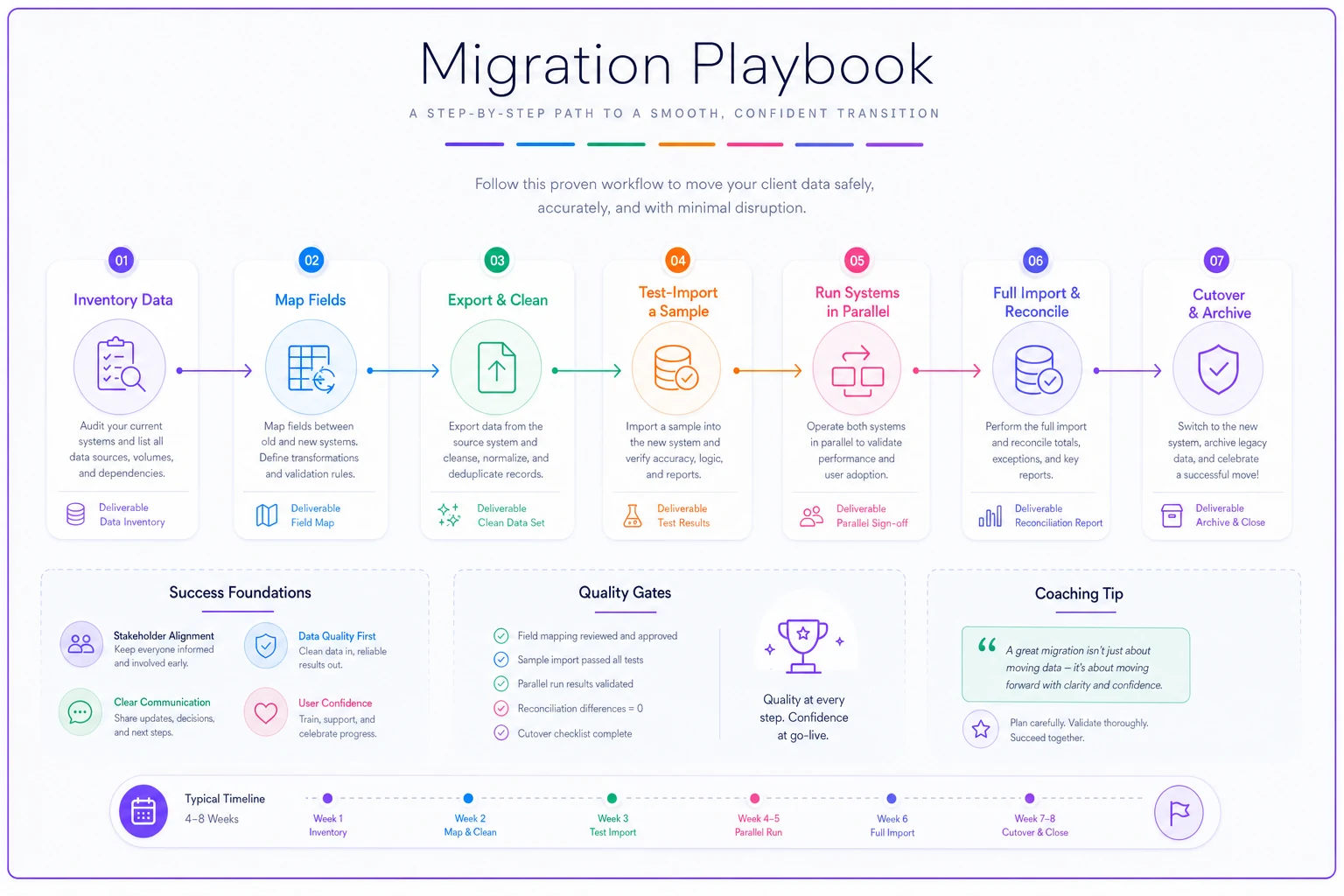
Use this visual as a checklist during your migration window so stakeholders can see progress at a glance.
Test notes attachment on a small sample first — it's the most common place data becomes orphaned.
The most common migration casualty is historical session notes losing their link to the right client — the data imports, but it lands orphaned. Always test notes attachment on your sample batch before trusting the full import.
Three platform archetypes matched to common scenarios
Rather than naming vendors (which dates fast), here are three archetypes. Match yourself to the scenario, then shop for the archetype.
Archetype 1: The all-in-one solo studio tool
Best for: Solo coaches and 2-person practices who want scheduling, payments, client portal, and basic automation in one login.
When it makes sense: You value simplicity over customization and you'd rather have 80% of features that just work than 100% you have to assemble. Your admin time is your biggest cost.
When it's a bad idea: You're planning real multi-coach growth within a year, or you need deep reporting for corporate buyers. You'll outgrow it and migrate anyway.
Archetype 2: The modular team platform
Best for: Practices with 3–12 coaches that need shared records, role permissions, and multi-coach reporting, with room to integrate accounting and a CRM.
When it makes sense: Coordination is the pain point — handoffs, utilization, consistency across coaches. You're willing to spend a bit on setup to get centralization.
When it's a bad idea: You're solo. You'll pay for collaboration features that add friction with no payoff. Don't buy team infrastructure for a one-person operation.
Archetype 3: The enterprise program suite
Best for: Practices running corporate cohorts, selling to org buyers, managing 50+ participants with stakeholder reporting and security requirements.
When it makes sense: Your buyers demand SSO, audit logs, data residency, and outcome dashboards. The contract depends on defensibility.
When it's a bad idea: You're pre-enterprise and hoping the tool will "level you up." It won't. You'll drown in configuration and pay enterprise prices for capacity you can't fill yet.
A real scenario: the 6-coach practice that scored its way out of a bad fit
A leadership-coaching practice with six coaches and around 180 active clients was close to signing with a slick all-in-one tool. Great demo, friendly rep, aggressive discount expiring Friday.
They built the weighted scoresheet first. Core features scored high — the delivery workflow was genuinely good. But two categories cratered: integrations (no accounting sync, export only through a support ticket) and security (no role separation, meaning every coach could see every client's notes). Weighted out, it landed around 320/500.
A less flashy modular platform scored lower on polish but higher where it actually mattered — clean API, proper permissions, real multi-coach reporting. It came out near 405/500. The 85-point gap made the decision obvious, and it survived scrutiny from both partners because it wasn't a gut call.
The practical payoff showed up at month-end. Reconciliation that used to eat most of a day dropped to a couple of hours once billing synced to their books, and no coach was manually re-keying numbers. Nothing dramatic — just hours back, every single month, and no awkward "why can I see Sarah's client notes" conversation with a new hire.
Make the decision defensible, not emotional
The entire point of this framework is to replace "which demo did I like best" with a model you can show someone else. Define your delivery model first. Score against weights you set before the sales pressure starts. Check data ownership in the actual contract language. Interrogate the migration plan. And buy for the practice you run now plus about a year — not the one in your five-year deck.
Coaching software platforms don't have to be a gamble. The practices that choose well aren't smarter; they just refuse to decide in the demo. Open this guide while the rep shares their screen, fill in your scores honestly, and let the numbers — and the red flags — do the talking.
The entire point of this framework is to replace "which demo did I like best" with a model you can show someone else. Define your delivery model first. Score against weights you set before the sales pressure starts. Check data ownership in the actual contract language. Interrogate the migration plan. And buy for the practice you run now plus about a year — not the one in your five-year deck.
Coaching software platforms don't have to be a gamble. The practices that choose well aren't smarter; they just refuse to decide in the demo. Open this guide while the rep shares their screen, fill in your scores honestly, and let the numbers — and the red flags — do the talking.
Ready to elevate your coaching business?
Join hundreds of coaches using Guidyly to save time, enhance client engagement, and grow their practice.