

Most platform migrations don't fail on migration day. They fail three weeks earlier, during vendor selection, when nobody asked the boring questions about how data actually moves. Then migration day arrives, the export file has 1,400 session notes with mismatched client IDs, and someone is manually copy‑pasting payment histories at 11pm because the new system rejected the import.
This playbook is about avoiding that night. It's built around one thing: giving you a coaching platform integration checklist you can run before you sign anything, plus the data‑mapping templates and rollout sequence that keep the switch from blowing up your active caseload.
Skipping the "what is an API" explanations here — if you're reading this, you already know you need one. What you probably don't have is a repeatable way to pressure‑test a vendor's claims, or a migration plan that won't lose client notes.
Why migrations quietly break (and it's rarely the data)
The common assumption is that migration risk lives in the data itself — bad formatting, missing fields, encoding errors. That part is real, but it's the predictable part. You can clean a CSV.
-
The old system won't give you everything. Plenty of coaching platforms let you export clients and sessions, but not internal notes — or they export notes as a single blob with no timestamp or author. You find this out after you've already committed.
-
IDs don't survive the trip. Your old system calls a client
cust8842. The new one assigns its own ID on import. Now every session, note, and payment that referencedcust8842needs re‑linking, and if the import runs those tables in the wrong order, the relationships break silently. -
Webhooks fire before the data exists. During cutover, if your scheduling tool pushes a "session booked" event to the new platform before the client record is imported, you get an orphaned event or a duplicate client.
-
Nobody owns the rollback. When things go sideways, the question "can we just go back to the old system?" gets asked for the first time — which is far too late to answer it.
The failure usually isn't one big error. It's a hundred small mismatches that nobody catches until a coach opens a client file mid‑session and half the history is gone. That's the scenario you're actually guarding against.
Phase 1: The pre‑selection integration checklist
Run this during the sales process, not after. If a vendor can't answer these clearly, that's your answer.
Never miss a session or detail again.
Guidyly helps you book, manage, and track every coaching session efficiently.
- Centralized session scheduling
- Automated client reminders
- Progress tracking & notes
No credit card required
Export and ownership
-
Can you export all of your data — clients, sessions, notes, payments, documents — not just a summary report?
-
What formats? (CSV/JSON is fine. A PDF report is not an export.)
-
Do exports include the original record IDs and created/modified timestamps?
-
Are session notes exported per‑session with author and date attached?
-
Is there a size or rate limit on exports? (Some platforms throttle you to a few hundred records per pull.)
API reality check
-
Is there a documented REST (or GraphQL) API with public docs you can read right now, before buying?
-
What's the rate limit, in requests per minute? (You'll need this for bulk imports.)
-
Does the API support bulk/batch operations, or is it one‑record‑at‑a‑time?
-
Can you create and update records via API, or is it read‑only?
Webhooks and sync
-
Which events fire webhooks? (booking created, session completed, payment succeeded/failed, client updated)
-
Can you pause or disable webhooks during migration?
-
Is there retry logic if your endpoint is down, and can you replay missed events?
Security and access
-
Role‑based access control — can you restrict who sees client notes vs. billing?
-
Does the vendor offer a sandbox/staging environment separate from production?
-
Where is data hosted, and do they sign a BAA or equivalent if you handle sensitive client information?
Print this. Make the vendor answer in writing. Those written answers become your test criteria later.
Phase 2: Required API and webhook features (the non‑negotiables)
Not every API is built for migration. Here's what you actually need versus what vendors love to advertise but rarely matters for a clean switch.
| Capability | Why it matters for migration | Deal‑breaker if missing? |
|---|---|---|
| Bulk record import (batch) | Importing 2,000 records one API call at a time will take hours and hit rate limits | Yes |
| External ID / idempotency key support | Lets you re‑run an import without creating duplicates | Yes |
| Full read export including notes | You can't migrate what you can't extract | Yes |
| Webhook pause/disable toggle | Prevents orphaned events during cutover | High |
| Payment history read access | Revenue recognition and refunds depend on it | Yes |
| Webhook retry + replay | Recover from endpoint downtime during go‑live | Medium |
| Field‑level update (PATCH) | Fix mapping errors after the fact without re‑importing everything | Medium |
| Attachment/file export | Intake forms, signed consents, worksheets | High |
The single most underrated item on that list is idempotency key support — sometimes called "external ID" or "upsert key." It means you can pass your own identifier with each record, and if you run the import twice, the system updates instead of duplicating. Without it, one failed batch means either deleting everything and starting over or hunting duplicates by hand. A typical example: a practice re‑ran a client import after a timeout and ended up with 380 clients showing twice — two days of cleanup that an upsert key would have made a non‑issue.
Phase 3: Data‑mapping templates
This is where most of the actual work lives. Before you touch either system, build a mapping sheet for each data type. The goal is a single source of truth that says this field in the old system becomes this field in the new one, and here's the transformation rule.
Use a column structure like this for every table:
Clients CSV mapping
| source_field | source_example | target_field | transform_rule | required |
|---|---|---|---|---|
| client_id | cust_8842 | external_id | pass through as-is | yes |
| full_name | "Dana R. Okafor" | first_name | split on first space | yes |
| full_name | "Dana R. Okafor" | last_name | everything after first | yes |
| dana@… | lowercase, trim | yes | ||
| phone | (415) 555-0199 | phone | strip to E.164 | no |
| status | active/paused/ended | lifecycle_stage | map to new values | yes |
| created_at | 2023-04-11 | created_date | ISO 8601 | yes |
Sessions CSV mapping
| source_field | source_example | target_field | transform_rule | required |
|---|---|---|---|---|
| session_id | sess_55021 | external_id | pass through | yes |
| client_id | cust_8842 | client_ref | link via client external_id | yes |
| date | 2024-09-03 14:00 | start_time | ISO 8601 with timezone | yes |
| duration_min | 50 | duration | minutes as integer | yes |
| type | "1:1 / group" | session_type | map to new enum | yes |
| attended | true/false | attended | boolean | no |
Notes CSV mapping
| source_field | source_example | target_field | transform_rule | required |
|---|---|---|---|---|
| note_id | note_9913 | external_id | pass through | yes |
| session_id | sess_55021 | session_ref | link via session ext_id | yes |
| author | "coach_marin" | author_ref | map to new user ID | yes |
| body | "worked on…" | content | preserve line breaks | yes |
| created_at | 2024-09-03 15:12 | created_date | ISO 8601 | yes |
| visibility | private/shared | visibility | map to new enum | yes |
Payments CSV mapping
| source_field | source_example | target_field | transform_rule | required |
|---|---|---|---|---|
| payment_id | pay_30442 | external_id | pass through | yes |
| client_id | cust_8842 | client_ref | link via client ext_id | yes |
| amount | 250.00 | amount_cents | multiply by 100, integer | yes |
| currency | USD | currency | uppercase ISO | yes |
| status | paid/refunded | status | map to new enum | yes |
| paid_at | 2024-09-01 | payment_date | ISO 8601 | yes |
| processor | stripe | processor | pass through | yes |
The critical pattern across all four: everything links through the external_id, and you import in dependency order — clients first, then sessions and payments, then notes last (since notes reference both). Get that order wrong and your linking rules fail on records that don't exist yet.
One mapping mistake worth flagging: storing money as a decimal. A lot of import corruption in payment data traces back to floating‑point rounding ($250.00 becoming $249.9999). Store amounts as integer cents during migration and convert on display.
Phase 4: Staging and QA test plan
Never test on production. Get a sandbox from the new vendor and run the whole thing there first.
A workable QA sequence:
-
Dry run with 20 records. Import 20 clients, 20 sessions, 20 notes, 20 payments. Check every field manually. This catches mapping errors before they're buried in volume.
-
Relationship check. Open 5 random clients in the new system. Does each one show their correct sessions, notes, and payment history? This is the step people skip, and it's the one that matters most.
-
Edge‑case batch. Import your weird records on purpose
clients with no sessions, sessions with no notes, refunded payments, clients with apostrophes or accents in their names, paused accounts.
-
Full‑volume dry run. Import the entire dataset into staging. Time it. Note the rate‑limit behavior. If 2,000 records takes 40 minutes in staging, plan for that window on go‑live.
-
Reconciliation count. Row counts must match
X clients out of the old system = X clients in the new one. Same for sessions, notes, payments. Any gap gets investigated before you proceed.
-
Spot‑check financial totals. Sum total lifetime payments in both systems. They should match to the cent. If they don't, your payment mapping has a problem.
Track reconciliation counts in a shared spreadsheet so coaches and ops can verify and sign off quickly.
The reconciliation count in step 5 is non‑negotiable. "It looks fine" is not a migration verification. Counts are.
Phase 5: The 90‑day pilot‑to‑full rollout
A simple visual timeline of the 90‑day rollout:
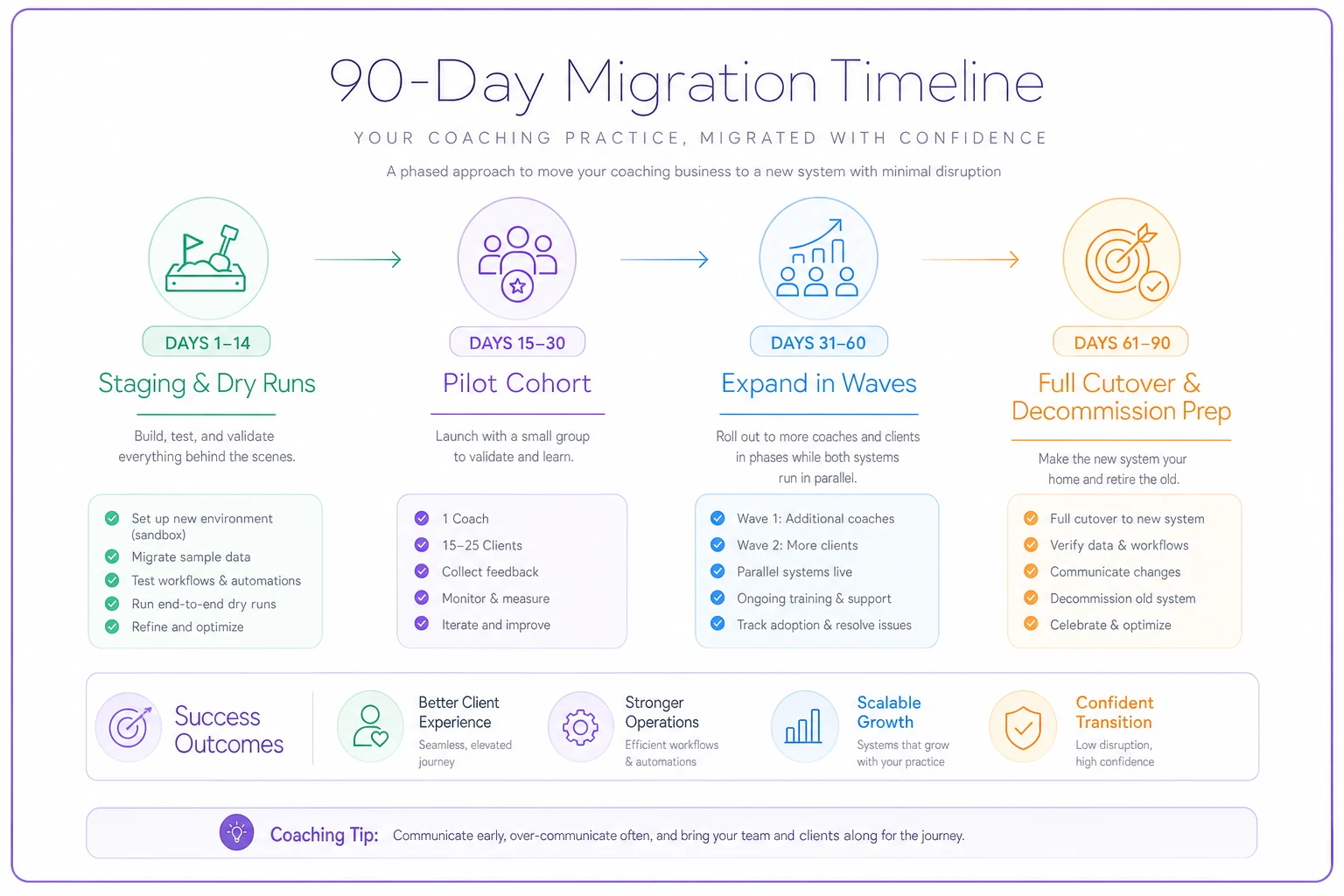
Days 1–14 — Staging and dry runs
-
Build and validate all mapping sheets
-
Run the full QA test plan above in sandbox
-
Document the exact import order and timing
-
Write the rollback procedure before you need it
Days 15–30 — Pilot cohort
-
Migrate one coach or one segment (say, 15–25 clients) to the live new system
-
Keep the old system running in read‑only parallel — don't delete anything
-
Coaches log sessions in the new system but can still reference the old one
-
Daily check‑in
anything missing, anything confusing?
Days 31–60 — Expand and run parallel
-
Migrate remaining clients in waves, not all at once
-
Keep both systems live. New data goes in the new system; old system stays as historical reference
-
Validate webhooks and integrations (scheduling, payments, reminders) with real traffic
-
This is also the window to re‑check your quality processes — if you track delivery consistency with something like a session fidelity scorecard, confirm the data it depends on is flowing correctly in the new system
Days 61–90 — Full cutover and decommission prep
-
All active clients on the new system
-
Turn off webhooks on the old system
-
Export a final full archive of the old system and store it securely (you'll want this regardless)
-
Only after a clean 30‑day run do you cancel the old subscription
Resist the urge to compress this timeline. The parallel‑run period feels redundant when everything's working — that's exactly why it's valuable. Problems tend to surface right in that window, not before it.
Rollback procedures (write these on day one)
The whole reason the pilot and parallel run exist is so rollback is cheap. Your rollback plan needs three things decided before go‑live:
-
A rollback trigger. What specifically makes you abort? Define it concretely: "more than 5% of records fail reconciliation," or "a coach loses access to active client notes during a session." Vague triggers mean you'll hesitate at the worst moment.
-
A rollback owner. One named person who has the authority to call it. Not a committee.
-
A data‑freeze rule. If you roll back, what happens to data entered into the new system during the pilot? The cleanest answer: during the pilot, treat the old system as the system of record for anything critical, so rolling back means you lose very little.
Because you kept the old system live in read‑only parallel, rollback is mostly just "keep using the old one." The danger is only real if you deleted or canceled too early — which is why decommissioning is the last step, never an early cost‑saving move.
A real scenario
A three‑coach practice carrying roughly 90 active clients switched platforms to consolidate scheduling, notes, and billing that were spread across three separate tools. Their first attempt — before any of this — was a straight export‑and‑import over a weekend.
It went badly. Session notes imported without author or date, so coaches couldn't tell which of them wrote what. Around 140 payment records came in as decimals and failed reconciliation by roughly $600 in rounding noise. Two clients with the same name got merged. They spent the better part of a week unwinding it and nearly lost trust internally.
The second attempt used mapping sheets, an external_id on every record, a 20‑record dry run, and a two‑week pilot on one coach's caseload. The full migration of all 90 clients then ran in a single afternoon with a reconciliation count that matched exactly. The difference wasn't better software. It was doing the boring Phase 1–4 work before touching production.
When a full migration actually makes sense — and when to wait
Do it when: your current tools can't talk to each other, you're paying for three overlapping subscriptions, or you've hit a ceiling where adding a coach means doubling manual admin work. Fragmentation that costs you hours every week is worth the migration pain.
Wait when: you're mid‑launch on a new program, heading into your busiest intake season, or the only reason to switch is a slightly nicer UI. Migrations have a real cost in attention, and running one during a crunch is how you lose client data at the worst possible time.
Any practice with active clients mid‑engagement should avoid a big‑bang cutover — there's always a safer phased path. If you're also planning to sunset the old tool entirely, pair this with a proper client offboarding and data‑retention process so exports and retention rules are handled cleanly rather than improvised.
The short version
Migration risk isn't really a data problem — it's a sequencing and verification problem. The practices that switch platforms cleanly are the ones that interrogate the vendor before signing, build mapping sheets that link everything through stable IDs, test on staging with real reconciliation counts, and run a parallel pilot with a rollback plan written in advance.
Everything in this coaching platform integration checklist exists to turn migration day from a high‑stakes gamble into a boring, verified afternoon. Boring is the goal. If your migration was uneventful and the counts matched, you did it right — and your coaches never even noticed the switch happened mid‑caseload. That, more than any feature list, is what a good migration looks like.
Everything in this coaching platform integration checklist exists to turn migration day from a high‑stakes gamble into a boring, verified afternoon.
Ready to elevate your coaching business?
Join hundreds of coaches using Guidyly to save time, enhance client engagement, and grow their practice.