


Most coaching practices don't fail at designing new programs. They fail at installing them. A solo coach can turn on a dime—new framework on Monday, live with clients by Wednesday. But the moment you have three or four coaches, a VA, a couple of corporate accounts, and a shared library of materials, "let's just start using the new thing" quietly becomes six different versions of the new thing, half the team ignoring it, and a client asking why their coach is still using the old worksheet.
Change management in a coaching practice isn't about memos and kickoff meetings. It's about the plumbing underneath a rollout: how you decide whether a change is worth the disruption, how you test it on a small slice before betting the whole practice on it, how you know it's actually being adopted, and—this is the part everyone skips—how you back out cleanly when it's not working.
This is the system I'd build if I had a four-to-eight person coaching team and wanted new programs, new tools, or new processes to actually stick without burning out the team or confusing clients.
Why coaching rollouts break in ways that don't look like change management
The frustrating part is that coaching practices rarely recognize a failed rollout as a failed rollout. It gets misdiagnosed as a people problem or a motivation problem.
A few patterns show up repeatedly:
-
A practice lead redesigns the intake and onboarding flow, announces it on a team call, and assumes it's "launched." Three weeks later, two coaches are still using the old intake because it's bookmarked and the new one isn't.
-
A corporate client pushes for a new reporting cadence, so the lead builds a fresh template and expects everyone to switch. Nobody agreed on which fields are mandatory, so every coach fills it out differently and the client sees inconsistency.
-
A new session framework gets adopted enthusiastically by the two coaches who were in the room when it was designed, and ignored by the three who weren't.
None of these are motivation failures. They're installation failures. The change had no gate, no owner, no adoption signal, and no way to tell whether it was working. In a small team there's an assumption that proximity equals alignment—"we all talk every day, so of course everyone's on the same page." In practice, the smaller the team, the more invisible the drift, because nobody's formally checking.
What breaks at scale is coordination. One coach can hold the whole process in their head. Five coaches can't, and when they try, you get what looks like five slightly different coaching practices operating under one logo.
The core idea: treat every change as a scoped experiment with an off-ramp
The mental shift that fixes most of this is simple to say and hard to practice: stop rolling things out and start piloting them.
Never miss a session or detail again.
Guidyly helps you book, manage, and track every coaching session efficiently.
- Centralized session scheduling
- Automated client reminders
- Progress tracking & notes
No credit card required
A rollout is a one-way announcement. A pilot is a scoped test with a defined population, a defined duration, explicit success criteria, and a pre-agreed decision about what happens next. The difference matters enormously for small teams because small teams can't absorb the cost of a bad full-practice change. If you roll a broken new homework system out to 60 active clients, you now have 60 cleanup conversations. If you pilot it with 8 clients across two coaches, you have a contained mess you can learn from.
This is the same logic that makes corporate pilots worth doing before you sign a full contract—you're buying information cheaply before committing. If you've thought through how to convert pilots into contracts for corporate clients, you already have the instincts. The internal version is just applying that discipline to your own operations instead of a client's.
Step 1: The impact assessment (before anyone touches anything)
Before a change gets a pilot slot, it needs a one-page impact assessment. Not a document for its own sake—a forcing function to make the lead actually think about blast radius.
For a small coaching team, the impact assessment answers five questions:
-
What exactly is changing, and what is it replacing? If you can't name the old thing being retired, you're adding, not changing—and additions quietly double workload.
-
Who does this touch? Coaches only? Clients? Corporate sponsors? Your VA handling scheduling? The more boundaries it crosses, the higher the coordination cost.
-
What breaks if this goes wrong? A new internal note template breaking is annoying. A new billing cadence breaking costs you cash and trust.
-
What's the reversibility? Can you undo this in a day, or is it baked into client-facing contracts and materials?
-
What does "better" look like, measured? If you can't name a signal, you can't tell success from noise.
Here's a quick way to triage changes by risk, which determines how much process each one earns:
| Change type | Blast radius | Reversibility | Process required |
|---|---|---|---|
| Internal template or note format | Coaches only | Same-day | Light: announce + confirm adoption |
| New session framework | Coaches + clients | ~1 week | Pilot with 1–2 coaches, adoption check |
| Onboarding/intake overhaul | Coaches + new clients | Moderate | Pilot gate + rollback plan |
| Billing/reporting cadence | Clients + sponsors | Hard | Full pilot, comms plan, rollback criteria |
| New tool/platform | Whole practice | Hard | Full pilot, train-the-trainer, data migration plan |
The insight most small teams miss: not every change deserves the same ceremony. Over-processing a note-template change makes the team roll their eyes and ignore your process when it actually matters. Match the weight of the process to the blast radius.
Step 2: Pilot gates—the decision points nobody sets in advance
A pilot without gates is just "trying something for a while until we get bored or busy." Gates are the pre-committed moments where you stop and decide, with criteria set before the pilot starts so you're not rationalizing after the fact.
-
Gate 0 — Go/No-Go to pilot. Impact assessment approved, pilot population chosen, success criteria written down, rollback criteria written down. Fuzzy success criteria means you don't pass this gate.
-
Gate 1 — Mid-pilot checkpoint (around the halfway mark). Is the pilot even running as designed? This gate catches the most common failure: the pilot silently never actually happened because coaches reverted to old habits. You're not measuring results yet—you're measuring fidelity.
-
Gate 2 — Decision gate. Compare against the success criteria. Three outcomes only: expand, extend (with a specific reason and a new end date), or roll back. "Let's keep going indefinitely" is not an allowed outcome—that's how zombie pilots eat your attention for months.
The pattern worth internalizing: the dangerous gate is Gate 1, not Gate 2. Teams obsess over whether the change worked and forget to check whether the change happened. A pilot that was never actually run but gets declared a success is how a practice convinces itself a broken process is fine.
A pilot that was never actually run but gets declared a success is how a practice convinces itself a broken process is fine.
Step 3: Define adoption success criteria that are actually measurable
"The team likes it" is not a success criterion. Adoption needs signals you can observe without interrogating people. For coaching teams, the useful adoption signals tend to cluster into three buckets:
-
Usage signals — Is the new artifact actually being used? Count how many sessions used the new agenda template vs. the old one. Count how many new clients went through the new intake. This is binary and honest.
-
Fidelity signals — Is it being used correctly? A new reporting template that everyone fills out differently has high usage and low fidelity. Pick two or three fields that must be consistent and check them.
-
Outcome signals — Did the thing it was supposed to improve actually improve? Fewer onboarding drop-offs, faster time-to-first-session, cleaner month-end reconciliation, better homework completion.
A realistic adoption target for a small team isn't 100%. Set something like: at least 80% of eligible sessions or clients using the new process by the end of the pilot, with the two priority fidelity fields consistent at least 90% of the time. If you're below that, you don't necessarily have a bad idea—you have an adoption problem, which is a different fix (usually training or tooling, not redesign).
The mistake teams make repeatedly: measuring outcomes while skipping usage. A change "fails" on outcomes when the real story is that only one coach ever tried it. You can't evaluate a program that was never consistently installed.
Step 4: Communications templates that cut the ambiguity
Most rollout communication in small practices is a single Slack message that says some version of "Hey team, starting next week we're switching to the new X, let me know if you have questions." That message guarantees drift because it leaves every important detail unstated.
-
What's changing and when (specific date, not "soon")
-
Who it applies to (all clients? new clients only? one coach's caseload?)
-
What to stop doing (naming the retired thing is non-negotiable)
-
Where the new materials live (one link, not "it's in the drive somewhere")
-
Who owns questions (one name)
-
How we'll know it worked (the adoption signal, stated plainly)
Then two more templates that most teams never write:
The client-facing note (if the change touches clients). Keep it short and frame it as improvement, not disruption: what they'll notice, what they need to do differently (ideally nothing), and who to ask. A new reporting format for a corporate sponsor needs a heads-up before the first new report lands, not an awkward "why does this look different?" email after.
The rollback note. Write this before you launch. If you have to back out, you don't want to be drafting the "we're reverting" message from scratch while stressed. Pre-writing it also makes rollback feel like a normal option instead of an admission of failure—which makes teams far more honest at the decision gate.
Step 5: Train-the-trainer recipes for teams without a training department
You don't have an L&D function. You have a lead coach who's already overbooked. So the training model has to be lightweight and self-propagating: train one person deeply, and give them a repeatable recipe to train the rest.
-
The 10-minute walkthrough — The trainer does the new process live, narrating the decisions. Not a slide deck. The actual thing, with a real (or realistic) client example.
-
The side-by-side — Old way vs. new way, so coaches see exactly what's different and what they're giving up. This defuses the "but the old way worked fine" resistance by making the upgrade concrete.
-
The one supervised rep — Each coach does it once while the trainer watches and corrects. One rep catches the majority of fidelity problems before they reach clients.
-
The reference card — A single-page cheat sheet that lives next to where the work happens. If the reference is three clicks deep, it won't get used and fidelity decays within two weeks.
Prioritize the one supervised rep—it's where fidelity actually transfers.
Training isn't an event—it's the supervised first rep. Teams that "train" via a group call and never watch anyone actually do the new thing get high confidence and low fidelity. The supervised rep is where change actually transfers.
This gets dramatically easier when your new program is already modularized—when a change means swapping one defined module rather than reinventing the whole engagement. If you've done the work to productize bespoke coaching work into a modular system, training on a change becomes "here's the new module and how it connects," which is far faster to transfer than "here's a whole new way of coaching."
Step 6: Rollback criteria—the part that makes everything else safe
Rollback is the most under-built piece of change management in small practices, and it's the one that makes teams willing to try things in the first place. If reverting is painful and embarrassing, people either avoid change entirely or push through bad changes to avoid admitting defeat. Pre-defined rollback criteria remove the ego from the decision.
-
Hard rollback triggers — things that force an immediate revert regardless of other signals. Example: a client-facing error, a billing discrepancy, or a compliance gap introduced by the change.
-
Soft rollback triggers — things that trigger a decision conversation, not an automatic revert. Example: adoption below 50% at Gate 1, or a fidelity field consistently wrong across coaches.
-
The revert runbook — the actual steps to go back
which materials get re-activated, who tells clients, what data gets preserved from the pilot so the attempt wasn't wasted.
A clean rollback is a successful outcome, not a failure. A pilot that rolls back cleanly after two weeks because the data said so is a win—you learned something cheap and protected the practice. The actual failures are the zombie changes that half-live for six months because nobody had the authority or the criteria to kill them.
A runbook you can reuse for every change
Here's the whole loop as a single repeatable runbook. Copy it, keep it short, run it the same way every time so the team stops treating each change as a novel event:
-
Draft the one-page impact assessment. Triage by blast radius using the table above.
-
Pass Gate 0. Success criteria + rollback criteria written down. No fuzzy criteria allowed.
-
Pick the pilot population. Small, real, and chosen for signal—include your most skeptical coach, not just the enthusiast.
-
Send the change announcement (internal, and client-facing if needed). Pre-write the rollback note now.
-
Run the train-the-trainer recipe, including one supervised rep per coach.
-
Hit Gate 1 (fidelity check). Is the pilot actually happening as designed? Fix adoption before judging outcomes.
-
Hit Gate 2 (decision). Expand, extend with a reason, or roll back. No zombies.
-
If expanding, re-run training for the rest of the team and update the reference card and SOP library.
-
If rolling back, run the revert runbook and capture what you learned.
-
Archive the one-pager and results so the next change benefits from this one.
Here's a simple visual of the runbook loop:
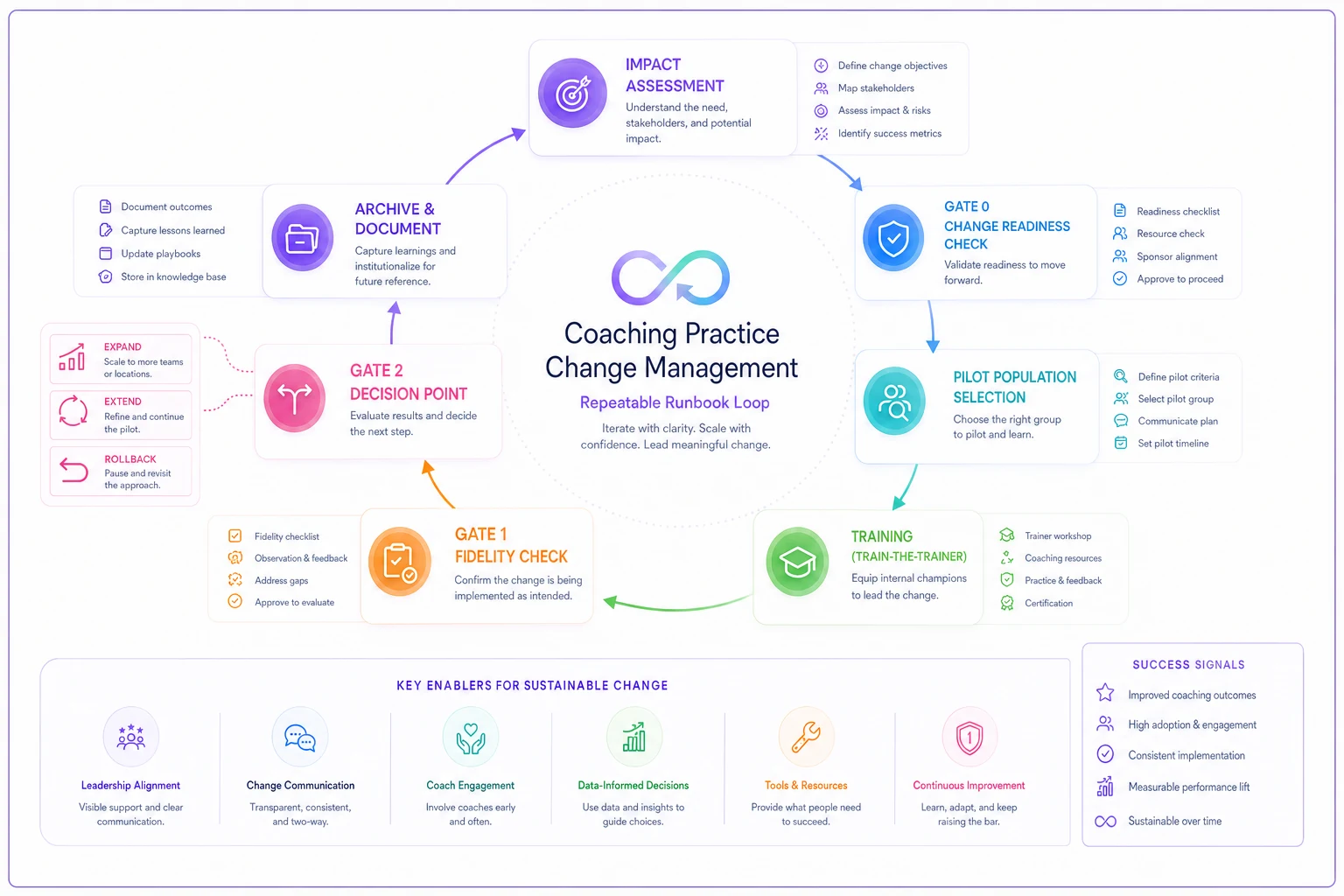
Copy it, keep it short, and run it the same way every time so your team stops treating each change as a novel event.
A real scenario: a four-coach practice replacing its intake flow
A small leadership-coaching practice—four coaches, one VA, a mix of individual clients and two corporate accounts—wanted to replace a clunky intake flow. The old intake was a long form plus an unstructured discovery call. New clients were taking around 10–12 days from signup to first real session, and roughly a quarter were going cold somewhere in that gap.
Their first instinct was to announce the new structured intake to the whole team and switch everyone over in a week. Instead they ran it as a scoped pilot: two coaches, new individual clients only, corporate accounts untouched, three-week window.
At Gate 0 they set the criteria plainly—time-to-first-session under 7 days, at least 80% of pilot clients completing the new structured intake without a nudge, and the two priority fields (goals and success definition) filled out consistently. Rollback trigger: any client confusion that generated a complaint, or adoption below half at the midpoint.
Gate 1 caught the real problem. One of the two pilot coaches had quietly reverted to the old discovery call because the new one "felt rigid." Usage was split. That's exactly the silent failure that would have poisoned the whole evaluation—they'd have concluded the new intake "didn't improve time-to-first-session" when half of it never ran. They did a quick supervised rep with that coach, adjusted the script to feel less scripted, and kept going.
By Gate 2, time-to-first-session had dropped to roughly 5–6 days for pilot clients, cold-drop in the gap was noticeably lower, and both coaches were using it consistently. They expanded to the full team, re-ran the short training, updated the reference card, and only then started a separate conversation about adapting it for corporate accounts—where the blast radius and the sponsor relationships made it a different, higher-stakes change.
The thing that made it work wasn't the new intake design. It was the fidelity checkpoint. Without Gate 1, they'd have killed a change that was actually fine and gone back to losing clients in the gap.
When this makes sense—and when it's overkill
When the full system is worth it: You have more than two or three coaches, shared client-facing materials, corporate accounts that expect consistency, and you're rolling out something that touches clients or money. The coordination cost is high enough that structure pays for itself.
When it's overkill: You're a solo coach or a tight pair who genuinely talk every day and share one caseload view. Running Gate 0 through Gate 2 on a note-template tweak will just slow you down and train your team to ignore process when it actually matters. Use the triage table—reserve the heavy machinery for high-blast-radius changes and keep the light stuff light.
Who should not adopt this wholesale: A practice that's still unstable on the basics—inconsistent delivery, no shared SOPs, no clarity on who owns what. If your underlying operations are chaotic, formal change management will just add process on top of chaos. Stabilize the core first, then layer this on to protect it.
Where tooling quietly helps
None of this requires software, and you can run the entire runbook with a shared doc and a calendar. But the places it gets painful by hand are predictable: tracking adoption signals across coaches, noticing that a pilot silently stopped running, and keeping the reference materials, SOP library, and rollback notes version-controlled so nobody's working off a stale copy.
That's where an operational platform earns its keep—not by "managing change" in some abstract sense, but by making the boring signals visible: which coaches are using the new process, which clients went through the new flow, whether fidelity fields are filled consistently, and whether a pilot is actually live versus quietly abandoned. The same observability discipline that keeps your tools and data healthy applies here. If you've thought about technology governance and observability for your practice, change observability is the natural extension—you're just watching your processes roll out the way you'd watch your systems run.
The operational platform doesn't replace the gates or the runbook—it just makes the signals easier to see and the checks cheaper to run.
The practices that successfully roll out new programs aren't the ones with the best ideas. Plenty of mediocre practices have great frameworks sitting unused in a drive folder. The ones that succeed install changes deliberately—small pilots, honest fidelity checks, measurable adoption, and a rollback plan written before launch so trying something new never feels like betting the practice.
Change management for a coaching team isn't bureaucracy. It's the difference between a new program that becomes how you actually work and a new program that becomes the fourth half-adopted thing cluttering your shared drive. Start with the impact assessment, respect the gates, watch adoption instead of assuming it, and keep the off-ramp clear. That structure is what lets a small team keep improving without quietly fracturing into several different practices operating under one name.
Ready to elevate your coaching business?
Join hundreds of coaches using Guidyly to save time, enhance client engagement, and grow their practice.