

Most coaching practices don't notice their tech has quietly broken until a client points it out. The intake form stopped forwarding leads for eleven days. The KPI dashboard has been pulling from a renamed column and reporting flat retention that isn't actually flat. The payment processor's webhook silently stopped firing, so three renewals never got recorded and nobody chased them.
None of these are dramatic. That's exactly the problem. They're slow, invisible failures that only surface when the damage is already done — and by then you're doing forensic work on a Tuesday night instead of coaching.
Observability is the boring skill that prevents this. Not the enterprise version with dashboards full of graphs nobody reads, but a scaled-down, coach-sized version: knowing where your numbers come from, running a few cheap health checks, having a runbook a non-technical assistant can follow when something breaks, and holding your vendors to a written standard. This is the operational backbone of technology governance coaching practices actually need — and almost none of them have.
Why coaching tech breaks quietly instead of loudly
A coaching stack is usually five to nine tools duct-taped together: scheduler, video, CRM, payment processor, email platform, a form builder, maybe a course host, plus a spreadsheet or dashboard sitting on top pulling from all of them. Each connection is a place where data can drift, stall, or lie.
The reason failures stay hidden is that nothing throws an error you'll see. When a Zapier connection breaks, you don't get a call. When an integration times out, the rest of the app keeps working fine. The tool that failed is still "up" from its own perspective — it just stopped talking to the next tool in line.
The fragile point is almost never the individual app. It's the handoffs between apps. A scheduler works. A CRM works. The sync between them is what quietly dies. If you've mapped these connections before — and if you haven't, the thinking in Coach Systems Architecture: Integration Patterns, Data Flows and the Failure Modes to Plan For is the right starting point — then observability is just adding a heartbeat to each of those handoffs so you find out when one stops.
The second reason things break quietly: the person watching the numbers is not the person who set up the plumbing. A solo coach owns everything, so they at least notice weirdness. The moment you add a VA or a second coach, ownership of "is the data right" gets fuzzy. Everyone assumes someone else is checking. Nobody is.
Metric provenance: knowing where every number actually comes from
Provenance is a fancy word for a simple question — for each number on my dashboard, what is the exact source, and how is it calculated? Most practices can't answer this cleanly, which means their KPIs are trustworthy right up until the day they aren't.
Never miss a session or detail again.
Guidyly helps you book, manage, and track every coaching session efficiently.
- Centralized session scheduling
- Automated client reminders
- Progress tracking & notes
No credit card required
Here's the pattern that bites people. A dashboard shows "monthly retention: 84%." Fine. But is that:
-
clients who renewed divided by clients whose contracts ended this month?
-
active clients this month divided by active clients last month?
-
pulled from the CRM's "status" field, which a VA updates manually and sometimes forgets?
Three different definitions, three different numbers. And if the definition quietly changes because someone renamed a field or edited a formula, your trend line lies to you without a single error message.
A metric provenance recipe fixes this by writing down, for each KPI, a short definition you could hand to a stranger. It doesn't need to be elaborate. One row per metric:
| Metric | Source system | Exact definition | Refresh | Owner | Last verified |
|---|---|---|---|---|---|
| Monthly retention | CRM "renewals" tag | Renewed clients ÷ clients with end-date this month | Weekly | Ops VA | Oct 2 |
| Active caseload | Scheduler + CRM | Clients with ≥1 session in last 30 days | Daily | Lead coach | Oct 5 |
| Collected revenue | Stripe payouts | Successful charges minus refunds, cleared | Monthly | Owner | Sep 30 |
| Lead-to-consult rate | Form → CRM | Consults booked ÷ form submissions | Weekly | Ops VA | Oct 2 |
The "last verified" column is the one people skip and the one that matters most. It forces someone to actually re-check that the number ties out to the raw source — not just that the dashboard rendered a figure. If you already run a metrics review, and the discipline in Operationalize Your Coaching KPI Dashboard is the natural companion here, provenance is what makes that review defensible instead of decorative.
The mistake people make is treating a dashboard as truth. A dashboard is a presentation of data that lives somewhere else. If you never reconcile it back to the source, you're trusting a photocopy of a photocopy.
Simple health checks a non-engineer can run
You don't need monitoring software to catch most failures. You need a handful of checks that a human can run in under ten minutes, on a schedule, looking for signs that a handoff has died.
The trick is to check outputs, not systems. Don't ask "is Zapier working?" — ask "did the last three form submissions show up in the CRM?" That question a VA can answer. The first one they can't.
A weekly health-check checklist that works for most practices:
-
Submit a test lead through your public intake form. Confirm it lands in the CRM within the expected time and triggers the welcome email.
-
Open the dashboard and pick one metric. Trace it back to the raw source and confirm the number matches within a reasonable margin.
-
Check the payment processor for any failed or disputed charges in the last 7 days that haven't been actioned.
-
Confirm the last automated reminder actually sent — look at one real client's message log, not just the automation's "success" status.
-
Scan the CRM for records created in the last week with missing key fields (no email, no program tag, no owner).
-
Verify calendar sync
does a session booked yesterday appear correctly in both the scheduler and the coach's personal calendar?
The reason this beats fancy monitoring for a small practice is that it's grounded in what clients actually experience. A monitoring tool tells you a server responded. A test lead tells you a real person's inquiry would have made it through. Those are different guarantees, and the second one is the one you actually care about.
Keep a dated checklist file your VA updates each week so "last verified" is obvious.
One thing worth flagging: the failures that hurt most are the ones where the system reports success. A reminder automation that "sent" to an invalid address counts as a success internally. That's why the health check says look at a real client's message log — you're verifying the outcome, not the status flag.
Here's a simple visual of that weekly health-check workflow.
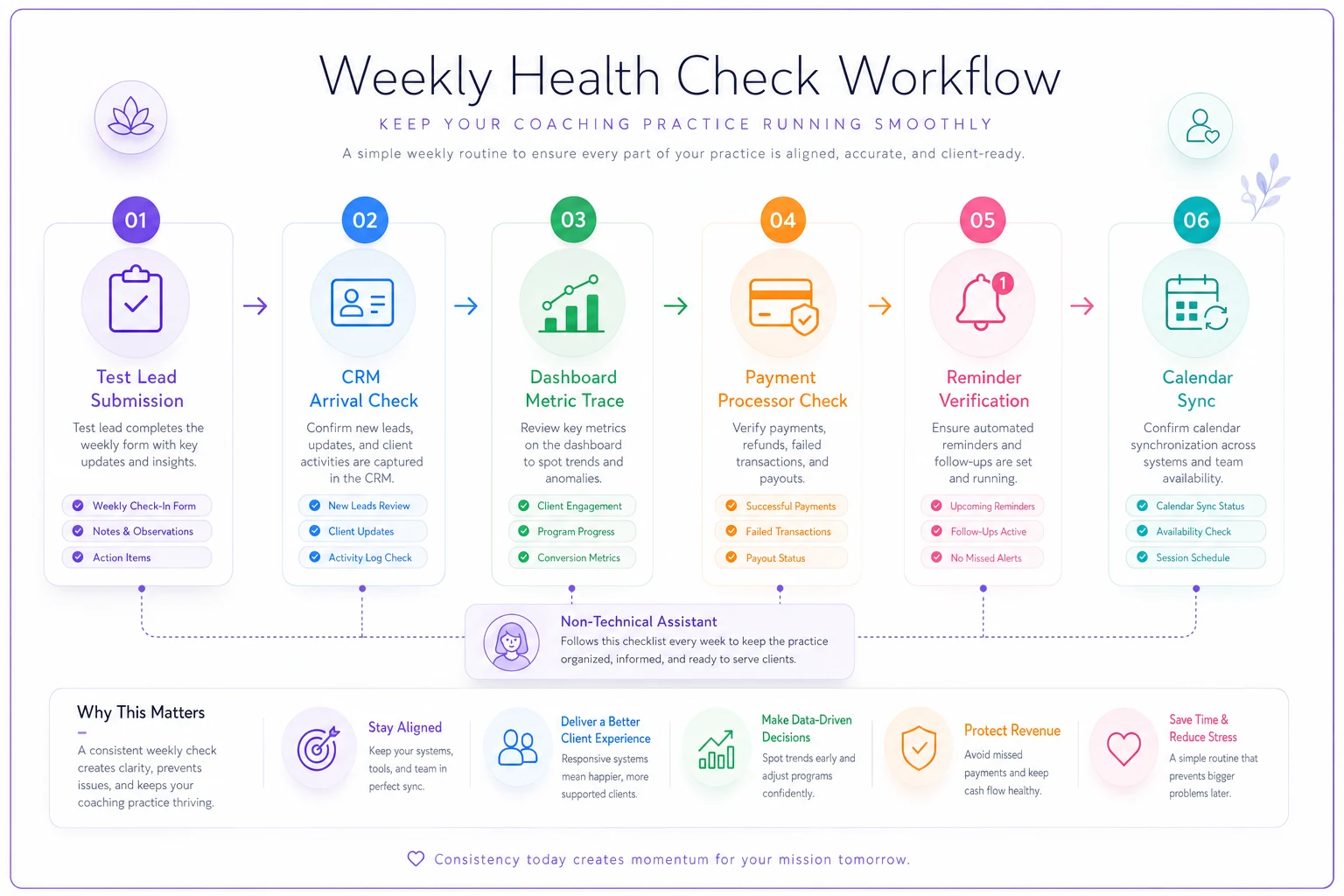
Use this visual as a quick reference when training an assistant or creating your checklist.
Incident runbooks your assistant can actually follow
When something breaks, the difference between a 20-minute annoyance and a two-day scramble is whether there's a runbook. Not a policy document — a runbook. Short, sequential, written for the least technical person who might have to run it while you're mid-session with a client.
Most coaching-tech incidents fall into maybe six repeatable categories. You don't need a runbook for every possible failure. You need one for each common shape of failure, and each should answer: how do I confirm it's really broken, what do I do to stop the bleeding, and who do I escalate to?
A workable runbook for "leads aren't reaching the CRM" reads like this:
-
Confirm it's real. Submit a test lead. Wait the normal delay. Check the CRM. If it arrives, this is a false alarm — note it and stop.
-
Contain it. If it doesn't arrive, switch the form's notification to also email the owner directly, so no new lead is lost while you fix the pipe.
-
Find the break. Check the integration tool's task history for errors. Note the timestamp of the last successful task — that tells you how far back the gap goes.
-
Recover lost data. Pull any submissions from the form tool itself (they're usually stored there even when the sync failed) for the gap window. Manually enter them into the CRM.
-
Escalate if stuck. If the integration won't reconnect in 15 minutes, open a support ticket with the vendor, paste the error, and reference the SLA response time.
-
Log it. One line
what broke, when, how long, what fixed it. This log is how you spot a tool that breaks repeatedly.
Step 4 is what separates a runbook from a panic. Most people, when leads stop syncing, focus entirely on fixing the connection and forget that the missed leads are sitting recoverable in the form tool. A good runbook makes the recovery non-optional.
When to write a runbook and when not to bother: if a failure would cost you money, a client relationship, or more than an hour to untangle, write the runbook. If it's cosmetic — a dashboard color looks off — don't. Runbooks are for consequential, repeatable failures.
Vendor SLAs: getting written commitments from tools you depend on
Your practice runs on tools you don't control. When your scheduler goes down during a launch week, or your payment processor holds a payout, you're at the mercy of a support queue. Governance means knowing, in advance, what each vendor has actually committed to — and not assuming.
Most coaches never read the SLA. Then an outage hits and they discover the "24/7 support" they thought they had is a chatbot and a 48-hour email queue on the plan they're paying for.
A lightweight vendor tracker sorts this out before you need it:
| Vendor | Role in stack | Support channel | Committed response | Uptime promise | Data export path | Renewal date |
|---|---|---|---|---|---|---|
| Scheduler | Booking | Email + chat | 24 hrs | 99.9% | CSV, monthly | Mar |
| Payment processor | Billing | Ticket | 1–2 biz days | not published | API / CSV | rolling |
| CRM | Client records | Chat (paid tier) | 4 hrs | none stated | Full CSV export | Aug |
| Email platform | Comms | 24–48 hrs | 99.5% | CSV | Jan |
Two columns earn their keep here. Committed response sets your realistic expectation during an incident — if the processor is 1–2 business days, your runbook can't assume same-day help. And data export path is your escape hatch. If a vendor can't cleanly export your data, you're trapped. Knowing the export exists before you're angry is far better than discovering it doesn't when you're mid-migration.
For anything touching client records, payments, or recordings, the SLA review overlaps directly with your broader risk posture — the controls laid out in the Governance Framework and Risk Controls for Coaching Practices are where vendor commitments should get documented and reviewed on a schedule, not just when something goes wrong.
What changes as you grow
At solo scale, you are the observability system. You notice when a number looks off because you touched every part of the business that day. Provenance lives in your head. That works — until it doesn't, and it stops scaling the moment someone else starts owning part of the workflow.
The first breaking point comes with your first hire. Now data gets entered by more than one person, definitions drift, and "who checks this" becomes a gap. This is when the provenance table stops being optional. Without it, two coaches will report retention two different ways and you'll waste a meeting arguing about which number is real.
The second breaking point comes with multiple coaches and higher volume. Manual health checks start eating real time, and the cost of an undetected failure goes up because more clients flow through the broken pipe before anyone notices. This is where a little automation earns its place — not to replace judgment, but to run the boring checks continuously. An operations platform that watches your key handoffs, flags when a sync stalls, and pings the right owner does exactly what your weekly checklist does, just without waiting a week to catch it. The point isn't fancy tooling; it's that the interval between failure and detection needs to shrink as the cost of failure grows.
The pattern is consistent: observability effort should scale with blast radius. When one broken automation could affect two clients, a weekly manual check is plenty. When it could affect forty, you want continuous checks and clear ownership baked into the system.
A real scenario
A three-coach practice — roughly 60 active clients, a mix of monthly and quarterly billing — kept seeing their reported revenue and their bank deposits disagree by a few hundred dollars most months. Not enough to panic, enough to nag. Their dashboard pulled "revenue" from CRM deal values, which a VA updated by hand. The processor payouts told a different story.
The gap turned out to be two things: a few renewals the VA marked "paid" in the CRM before the charge actually cleared, and a couple of failed charges that never got flagged because the failed-payment webhook had quietly stopped syncing weeks earlier. Nobody noticed because the CRM still looked right.
They didn't buy anything new to fix it. They wrote a provenance recipe that redefined "collected revenue" as cleared processor payouts only, added a weekly health check to reconcile CRM against payouts, and wrote a two-step runbook for spotting unactioned failed charges. Within a couple of months the monthly gap closed to near zero — and they caught somewhere around $600–$900 in failed charges they'd otherwise have written off silently. The fix wasn't technical brilliance. It was knowing where the number came from and checking it on a schedule.
Where to start
If this all feels like a lot, it collapses into a short sequence. Pick your five most important numbers and write a one-line provenance recipe for each. Build a ten-minute weekly health check that traces one metric to source and sends a test lead through your funnel. Write runbooks for the two or three failures that would actually hurt. Fill in a vendor row for each tool you truly depend on.
That's the whole coach-sized observability setup. It's unglamorous, it takes an afternoon to build, and it's the difference between a practice whose numbers you can trust and one that's quietly making decisions on data that stopped being accurate a month ago.
Technology governance in a coaching practice isn't about controlling every tool — it's about never being surprised by one.
Ready to elevate your coaching business?
Join hundreds of coaches using Guidyly to save time, enhance client engagement, and grow their practice.