


Most coaches start with Calendly and Stripe. Six months later, they're juggling seven different platforms that barely talk to each other, manually copying client notes between systems, and spending Sunday nights trying to figure out why their revenue numbers don't match across tools. The problem isn't the tools. It's that nobody teaches you how these systems should actually connect, what data needs to flow where, and what breaks when you hit 40+ clients. Building operational software for coaching practices—solo practitioners up to 12-coach organizations—the same integration failures keep showing up. Not because coaches pick bad tools, but because they don't plan for how data actually moves through the business.
The core data model every coaching practice needs
Your entire operation revolves around three data objects that everything else references. Get these wrong and you'll be fixing mismatches forever.
Client Master Record
This is your single source of truth for who your clients are. Not payment info, not session notes—just their core identity across all systems.
-
Unique client ID (that every other system references)
-
Basic contact info
-
Enrollment status (prospect, active, paused, churned)
-
Primary coach assignment
-
Client tier or program type
-
Original source/referral data
What doesn't belong here:
-
Payment methods (lives in payment processor)
-
Session notes (lives in knowledge management)
-
Scheduling preferences (lives in calendar system)
-
Progress metrics (lives in tracking system)
Session Record
Every client interaction generates a session record. Not just scheduled appointments—cancelled sessions, no-shows, async check-ins, all of it.
Core session data:
-
Session ID
-
Client ID reference
-
Coach ID
-
Session type (intro, regular, emergency, check-in)
-
Scheduled time
-
Actual time (if different)
-
Status (scheduled, completed, cancelled, no-show)
-
Duration
-
Session number in sequence
The piece most coaches miss: session records need to exist even when sessions don't happen. A no-show is still data. A last-minute cancellation tells you something about client engagement.
Workflow State
This tracks where each client sits in your operational process. Not their personal progress—their administrative state.
Essential workflow states:
-
Onboarding stage (inquiry, booked intro, contract sent, onboarded)
-
Payment status (current, overdue, failed, paused)
-
Engagement level (highly engaged, normal, at-risk, dormant)
-
Next required action (by coach or client)
-
Days since last meaningful interaction
Most practices try to track this in their heads or through calendar color-coding. That works until around 25 clients. After that, things start slipping through.
Integration patterns that actually work
A typical coaching practice ends up with 5–8 core systems that need to share data. Here's what actually needs to connect and how.
Never miss a session or detail again.
Guidyly helps you book, manage, and track every coaching session efficiently.
- Centralized session scheduling
- Automated client reminders
- Progress tracking & notes
No credit card required
Calendar ↔ CRM Integration
Your calendar system (Calendly, Acuity, Cal.com) needs bidirectional sync with your CRM or client database—but not everything should sync.
What should flow from calendar → CRM:
-
New bookings with client ID
-
Cancellations and reschedules
-
No-show flags
-
Session completion confirmations
What should flow from CRM → calendar:
-
Client tier (affects available session types)
-
Package limits or credits remaining
-
Special scheduling rules or restrictions
-
Coach assignment preferences
Common failure mode: most integrations create duplicate client records when someone books with a slightly different email. You need matching logic that checks multiple fields, not just email.
Payment Processor ↔ Everything Else
Payment data needs to flow to multiple systems, but payment logic shouldn't be scattered everywhere.
Payment processor → CRM flow:
-
Successful payment confirmations
-
Failed payment attempts
-
Subscription status changes
-
Refunds or credits applied
Payment processor → Calendar flow:
-
Package credits or session allowances
-
Booking restrictions for overdue accounts
-
Automatic holds for failed payments
The trap a lot of practices fall into: letting your payment processor become the source of truth for client data. Stripe or Square shouldn't be where you manage relationships—they handle transactions and report status back to your core systems.
Knowledge Management Connections
Session notes and documentation need careful integration planning. Too tight and you create compliance problems. Too loose and coaches can't find critical information mid-session.
Session notes should reference but not duplicate:
-
Session ID from calendar
-
Client ID from CRM
-
Basic session metadata (date, type, duration)
What stays only in KM:
-
Actual session content
-
Personal client information
-
Progress assessments
-
Clinical or sensitive notes
One practice had session notes automatically copying into their CRM activity feed. Seemed efficient until they realized their VA could read confidential client information. Keep sensitive content isolated.
Recording & Content Systems
If you record sessions (with consent), those files need smart handling:
-
Automatic naming with client ID and session date
-
Retention policies that auto-delete after a set period
-
Access logs showing who viewed recordings
-
Backup locations separate from primary storage
The worst-case scenario: recordings scattered across Zoom, Google Drive, and Dropbox with no consistent naming. Good luck finding that breakthrough session from three months ago.
Real failure modes from actual coaching practices
The Cascade Failure
Mid-sized practice, 6 coaches, roughly 340 active clients. Their Calendly integration with Stripe worked fine—until Stripe updated their API. Suddenly, clients could book sessions even with failed payments.
Three weeks passed before anyone noticed. By then they'd delivered 80+ sessions to clients with overdue accounts, somewhere around $12,000 in services. Recovery rate on those sessions was about 60%. The rest churned rather than pay the accumulated balance.
The Data Divergence Problem
Solo coach with 45 clients: Acuity for scheduling, ConvertKit for email, Notion for notes. Each system had a slightly different client list:
| System | Record Count | Issue |
|---|---|---|
| Acuity | 45 active clients | Accurate active count |
| ConvertKit | 67 subscribers | Included prospects and former clients |
| Notion | 38 clients with notes | Missing recent signups |
She spent every Monday reconciling these lists manually. When tax season came, her revenue reports were off by around $8,000 because completed sessions weren't matching payment records.
The Permission Catastrophe
A group practice gave all coaches admin access to their integrated systems for "flexibility." One coach accidentally bulk-updated payment plans while trying to fix a single client's billing.
Result: 120 clients got moved to the wrong payment tier. Some overcharged, some undercharged. Fixing it took around 40 hours of manual review and $2,400 in refunds for overcharges they couldn't justify keeping.
Observability: knowing when things break
You can't prevent every failure, but you can catch them fast. Most practices that get into serious trouble aren't dealing with one dramatic event—they're dealing with small errors that compounded quietly for weeks before anyone noticed.
Here's what to monitor across three time horizons:
Daily Health Checks
-
New bookings appearing in both calendar and CRM
-
Payment confirmations matching scheduled sessions
-
No-show rates above normal baseline
-
Failed reminder messages or emails
Weekly Integration Audits
-
Count mismatches between systems
-
Orphaned records (sessions without clients, payments without sessions)
-
Duplicate client records created
-
Sync failures or error logs
Monthly Deep Dives
-
Revenue reconciliation across all systems
-
Client count verification
-
Data field consistency checks
-
Permission and access reviews
Set up alerts for critical failures—things like more than 3 failed payments in a single day, calendar sync down for over 2 hours, client data appearing in the wrong access tier, or backup failures. These aren't edge cases. They happen regularly in practices that don't have monitoring in place.
Alert on orphaned records to catch sync issues early.
These monitoring practices help you spot slow-compounding problems before they become crises.
The incident response checklist
When integrations fail—and they will—you need a clear response plan. Improvising under pressure is how small problems become expensive ones.
Immediate Actions (First 30 minutes)
-
Stop the bleeding—disable the broken integration
-
Switch to manual backup process
-
Notify affected coaches
-
Document exactly when the failure started
Assessment Phase (First 2 hours)
-
Identify scope—how many clients and sessions affected?
-
Check data integrity in all connected systems
-
Determine if client-facing services are impacted
-
Calculate potential revenue impact
Recovery Phase
-
Fix the integration or implement a workaround
-
Reconcile data gaps manually if needed
-
Re-run any failed automations
-
Verify the fix with test transactions
Follow-up Requirements
-
Client communication if they were affected
-
Financial adjustments if needed
-
Document root cause
-
Update monitoring to catch similar issues
-
Adjust backup procedures
The follow-up step is the one most practices skip. Without a documented root cause and an updated monitoring rule, the same failure usually shows up again in a different form six months later.
Building resilience into your integrations
Practices that scale successfully don't have perfect integrations—they have resilient ones. They plan for failures and build in redundancy.
Start with loose coupling
Your systems should enhance each other but still function independently. If Calendly goes down, you should still be able to manually book sessions. If Stripe has issues, you should have backup payment methods. Dependency chains that run six systems deep are fragile by design.
Implement circuit breakers
When an integration fails repeatedly, it should automatically stop trying and alert you—not keep corrupting data with partial syncs. Set retry limits and failure thresholds before something goes sideways, not after.
Maintain escape hatches
Every automated process needs a manual override. Every integration needs a fallback. Every sync needs a way to reverse it. This sounds obvious but a surprising number of coaching practices have built automations they genuinely can't undo without calling the software vendor.
Document your data flows
Draw out how data moves between systems. Note what triggers each flow, what validation happens, and what the fallback process is. Update it quarterly as your stack evolves.
One practice that rebuilt their integration architecture went from spending about 10 hours weekly on data fixes to under 2. Not because the integrations got more sophisticated—because they got more predictable.
The data flow diagram below shows a typical coaching practice integration pattern and where failure points most commonly occur:
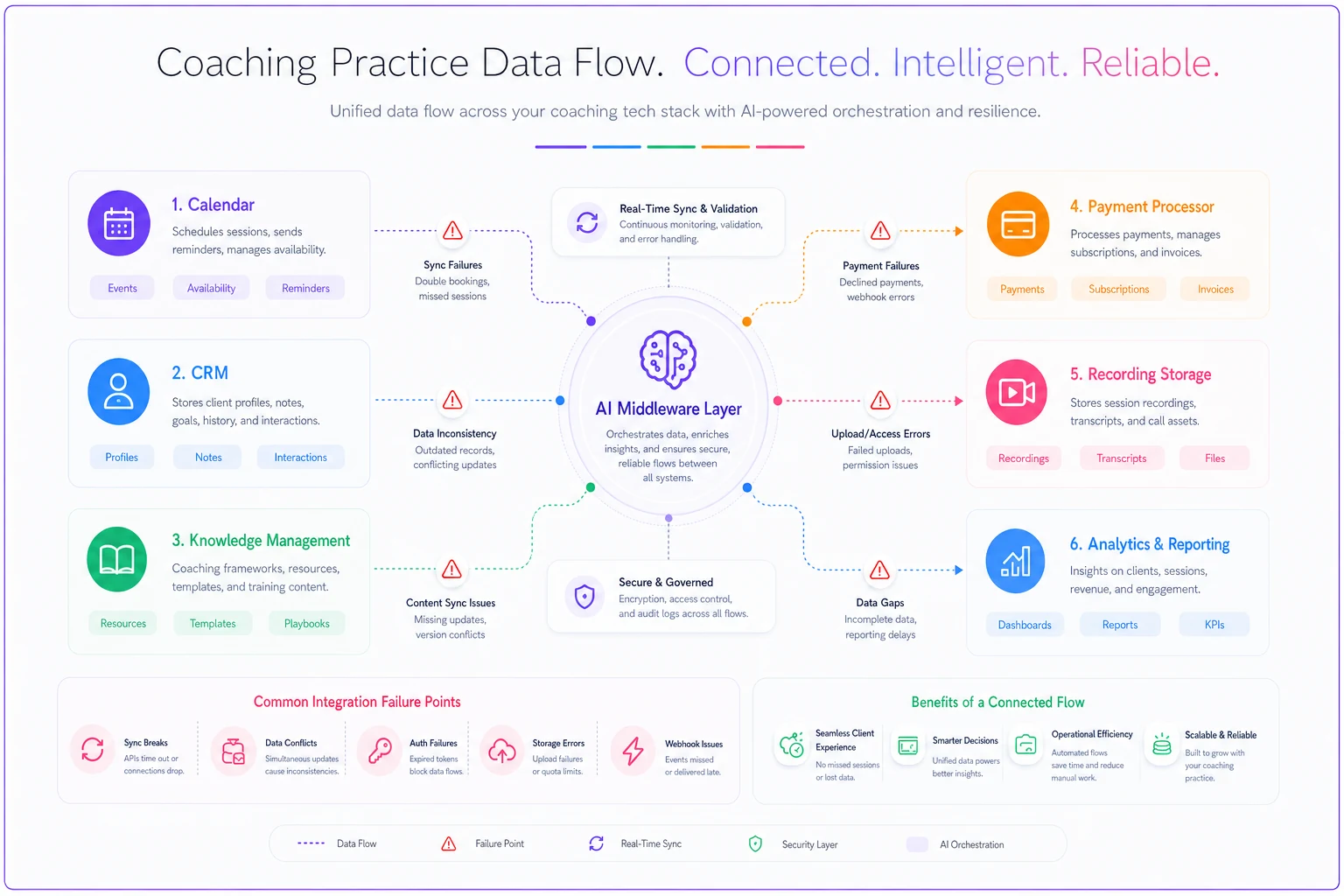
Understanding this map before you're in the middle of an incident is what separates practices that recover quickly from ones that spend weeks cleaning up data.
Where AI automation fits into integration stability
AI-powered operational platforms are starting to change how coaching tech stacks hold together. Instead of brittle point-to-point connections, AI automation can act as an intelligent middleware layer that catches problems before they compound.
When a client's email changes in one system, AI can update it everywhere or flag the discrepancy for review rather than letting two systems quietly diverge. Cancelled-then-rescheduled sessions, partial refunds, clients switching coaches mid-package—these are the edge cases that break traditional integrations. Platforms with AI automation built in can apply business logic to handle them consistently.
There's also the operational visibility piece. Instead of jumping between five systems to get a client overview, coaches can pull unified information instantly—which matters more as practices grow.
That said, AI automation enhances solid integration architecture. It doesn't replace it. The fundamentals—clean data models, clear integration patterns, failure planning—still have to be there first.
When integration complexity signals it's time to grow your infrastructure
There's a point where duct-taping systems together stops working. It usually hits somewhere around 60–80 active clients, 3+ coaches, multiple program types, or mixed payment models (subscriptions, packages, single sessions). Not always all at once—sometimes just two of those is enough to expose the cracks.
Signs you've outgrown basic integrations:
-
Sunday nights spent fixing data mismatches
-
Coaches struggling to find client information
-
Revenue reports that don't match bank deposits
-
Clients getting incorrect automated messages
-
Manual processes quietly creeping back in
When you're seeing two or more of these regularly, investing in proper operational infrastructure—better integrations, unified platforms, or AI-assisted systems—stops being a nice-to-have.
Your tech stack will never be perfect. Systems fail, APIs change, data occasionally drifts. The practices that scale aren't the ones with flawless integrations—they're the ones that planned for failures before they happened.
Build with failure in mind. Plan your data model before choosing tools. Monitor actively rather than hoping everything's fine. Keep manual fallbacks for every automated process. If you're spending more time managing integrations than coaching, something needs to simplify—whether through careful integration planning, AI automation, or moving to a unified platform built for coaching operations. The goal is the same either way: systems that handle the operational noise so coaches can stay focused on clients.
Ready to elevate your coaching business?
Join hundreds of coaches using Guidyly to save time, enhance client engagement, and grow their practice.